Blog :: I Love My PinePhone
For the past ten months, I've been using my PinePhone as a "daily driver." By which, I mean it's been in my pocket everywhere I go, and it's the device I use to make phone calls. Depending on your familiarity with the PinePhone (or the state of "Linux Phones" more generally) this statement is either delirious, or vapid (why should I care that you use a "smart" phone just like the rest of us?) Don't be mistaken: the PinePhone is usable as a little cellular-capable PDA, and it's in a league of its own. This article is my attempt to document my experiences and rationale for wanting to use one, as well as my thoughts on mobile Linux in general.
I expect "Linux Phone" to be a readily understood term by readers of mine, but it is a somewhat imprecise term. So I'll clarify that by "Linux Phone," I mean a mobile phone that runs not only the Linux kernel, but also the user space and general experience we all associate with the Linux operating system1. Notably, this excludes Android2, which has existed for several years. Not long ago, a Linux Phone seemed like a pipe dream: one I've had ever since I first held a smartphone I could call my own. Perhaps it's impractical for many, but I would be happy to trade ubiquity for being able to carry around workstation-like capability in my pocket. I don't use social media like Instagram, or proprietary messaging applications like WhatsApp and Snapchat. As long as I can run my usual Linux software stack, and have a modem that can receive and send phone calls and text messages, my needs are met. So when the PinePhone was announced in 2019, I was excited. Not only did it tick many of the boxes for my dream of a "Linux Phone," but it came from PINE64, a vendor I'd had great experiences with in the past, being a Pinebook Pro owner.
The idea of Linux phones had been at least somewhat popularized at that point with the earlier announcement of the Librem 5, but the Pinephoe was far more affordable, and it would be hitting the market well before the Librem 5. I got it as a Christmas gift from my wonderful mother. Unfortunately, this was amidst my hellish time as an undergrad, so I didn't have the time to fully buy into swapping over my mobile compute stack. So it waited until I graduated. I actually am somewhat happy that I waited, though, because the software situation is much better today than it was three years ago.
My previous "smart" phone was a Huawei Honor 5X, which I purchased for about $200 before the Trump administration banned domestic sales of Huawei products.3 I flashed CyanogenMod (later LineageOS) the second I removed it from the box for reasons I expect to be self-evident. Initially, it was a significant upgrade over my previous 2nd generation Moto G, but the experience soon grew unbearable as the LineageOS image for the device grew unmaintained. The System UI would freeze frequently, rendering the phone inoperable until I forcefully rebooted it; expanding the usable disk space with an external SD card resulted in strange errors and often the SD would show up as "corrupted" until I rebooted the phone enough times; and I would frequently have the phone reboot to TWRP while I was walking around with it in my pocket, a symptom I strongly suspect to be related to panics in the old, non-mainline Kernel.4 The battery also couldn't hold a charge, and I was able to remedy that by replacing it, but the difficulty I had in finding OEM parts suggested that regularly servicing the battery probably wasn't sustainable. It was time for a change.
The First Week
With that, you now understand the situation I found myself in last October. Software support for my mobile phone was suddenly non-existent, and I was growing frustrated with it. I had the option of setting up the experimental PinePhone I'd been hoarding, or fronting a couple hundred dollars for a new cellphone. I went with the former.
Unboxing
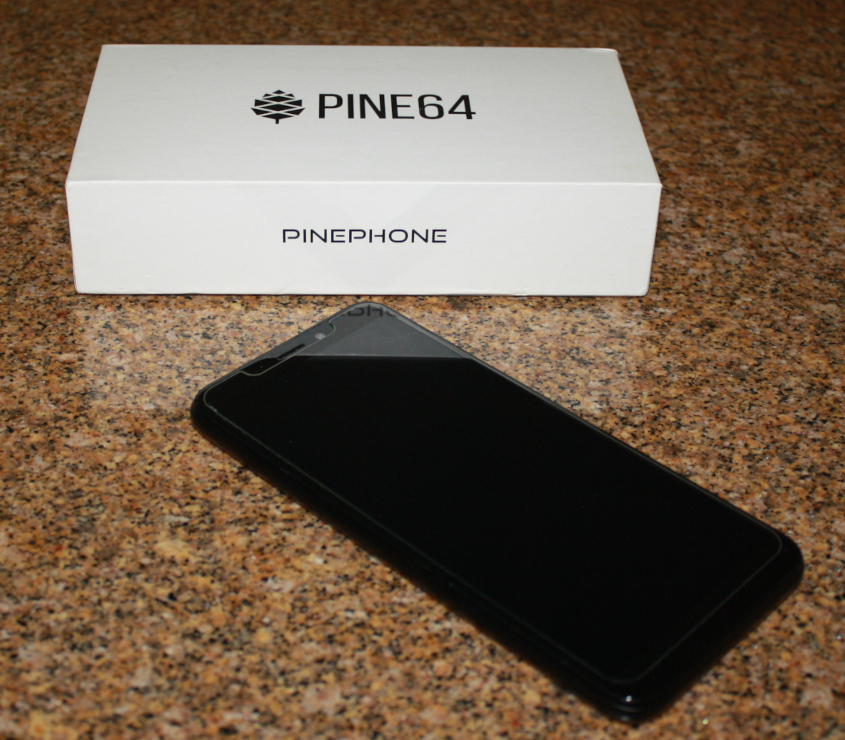
The PinePhone's initial presentation engenders confidence. Despite the cost, the box it comes in feels nice and gives me the sense that I have a quality product in my hands. The phone comes in a protective sleeve, with a USB-C cable and a leaflet with some information. It isn't a manual, but it does link to the Pine64 wiki, which is close enough to one.
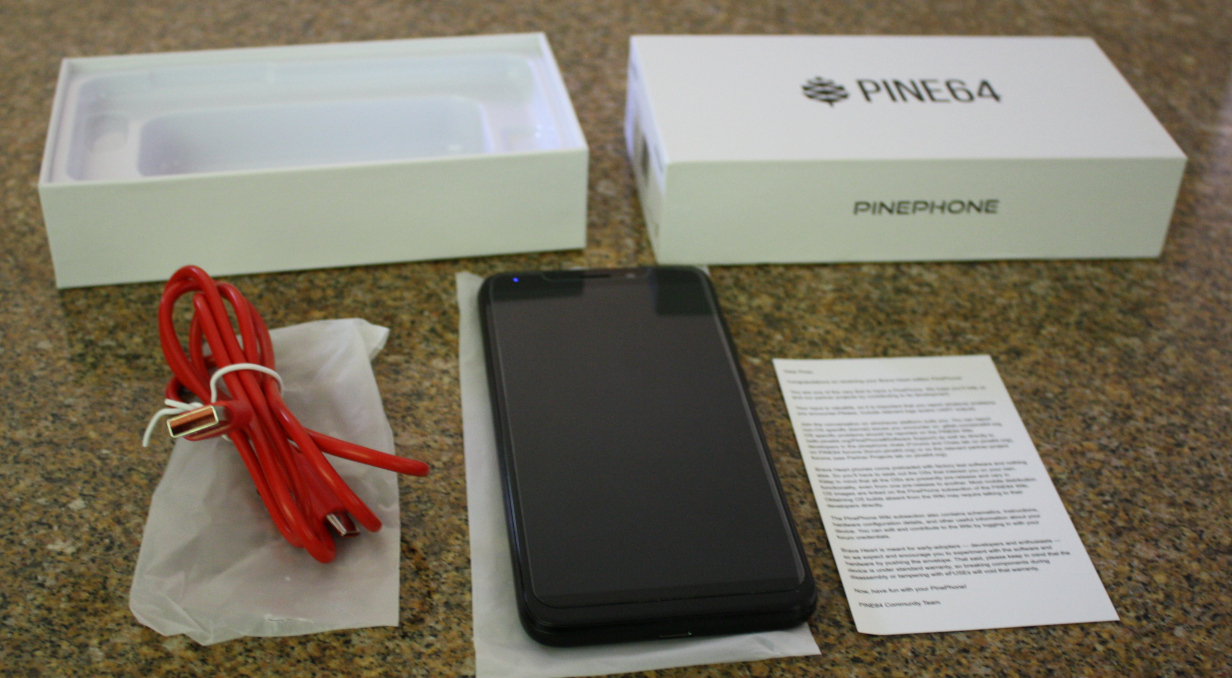
![Dear Piner, Congratulations on receiving your Brave Heart edition PinePhone! You are one of the very first to have a PinePhone. We hope you'll help us and our partner projects by contributing to development. [Line Break] Your input is valuable, so it is important that you report whatever problems you encounter. Please, include relevant logs and/or UART outputs. [Line Break] Join the conversation on whichever platform suits you. You can report non-OS specific (kernel) issues you encounter on gitlab.com/pine64-org. OS specific problems should be reported on the PINE64 Wiki (wiki.pine64.org/PinePhone#Software Support) as well as directly to developers in the PinePhone chats (Forums and Chats tab on pine64 org), on PINE64 forums (forum.pine64.org) or on the relevant partner-project forums (see Partner Projects tab on pine64.org). [Line Break] Brave Heart phones come preloaded with factory test software and nothing else. So you'll have to seek out the OSs that interest you on your own. [Line Break] Keep in mind that all the OSs are presently pre-release and vary in functionality, even from one pre-release to another. Most mobile distribution OS images are linked on the PinePhone subsection of the PINE64 Wiki. Obtaining OS builds absent from the Wiki may require talking to their developers directly. [Line Break] The PinePhone Wiki subsection also contains schematics, instructions, hardware configuration details, and other useful information about your device. You can edit and contribute to the Wiki by logging in with your forum credentials. [Line Break] Brave Heart is meant for early-adopters — developers and enthusiasts — so we expect and encourage you to experiment with the software and hardware by pushing the envelope. That said, please keep in mind that the device is under standard warranty, so breaking components during disassembly or tampering with eFUSEs will void that warranty. [Line Break] Now, have fun with your PinePhone! [Line Break] PINE64 Community Team"](./pinephone-3.jpg)
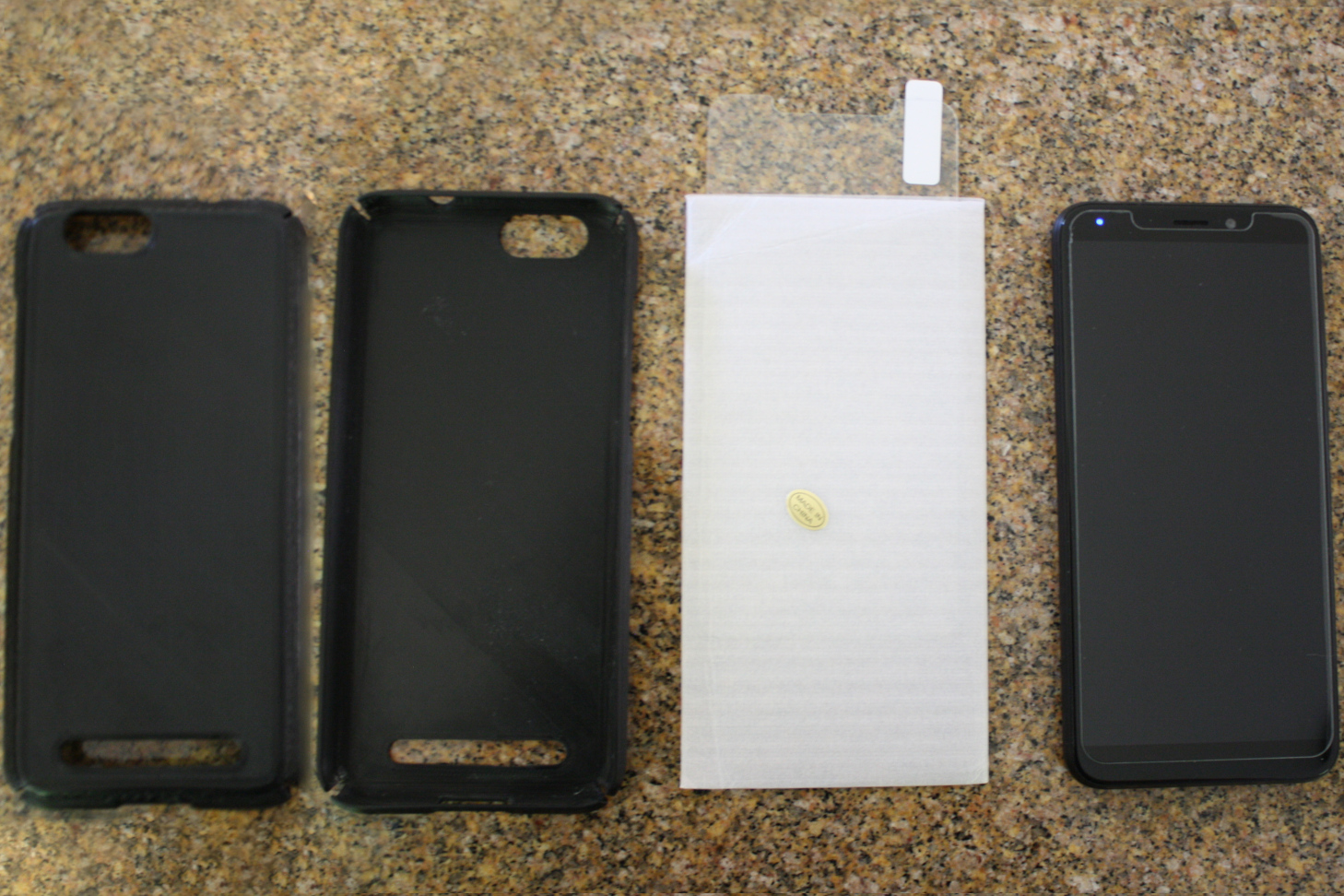
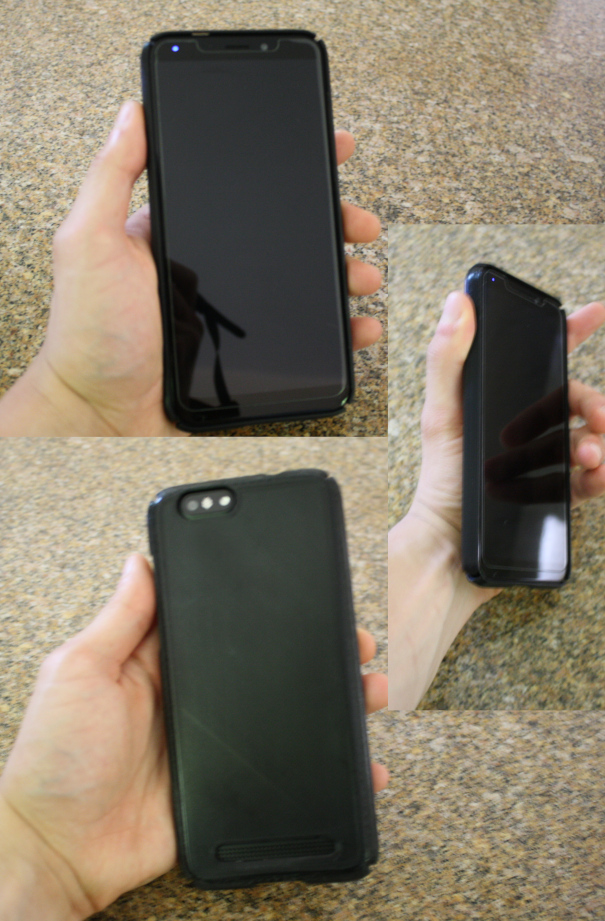
I care about the longevity of my gadgets, so I went on Thingiverse and found a hard case design for the PinePhone. I could've spent more time sanding it down and making it look nice, but it was good enough for me at the time. I'm still inexperienced with making "good" 3D-printed parts. The roughness led to a few minor scratches on the back cover, but it's saved my PinePhone from worse damage on several occasions.
The PinePhone shuts itself off upon impact. I think that's a bug, rather than a feature, but I'm usually careful enough that it doesn't happen often. (In fact, it's usually when others are handling my phone that it falls.)
Per this Reddit comment, I purchased a pack of cheap tempered glass screen protectors designed for the iPhone Max XS. I haven't dropped the phone enough to put it to its limits, but thus far it's done well to keep the front of the phone free from scratches.
The PinePhone arrives flashed with a "factory test image" which is suitable for
verifying that the hardware on the PinePhone is functional before you proceed
with it configuring it. The test for the modem was finicky, and the motor test
did not work. The device, at this point, was well past the limited warranty, so
I decided to press regardless.
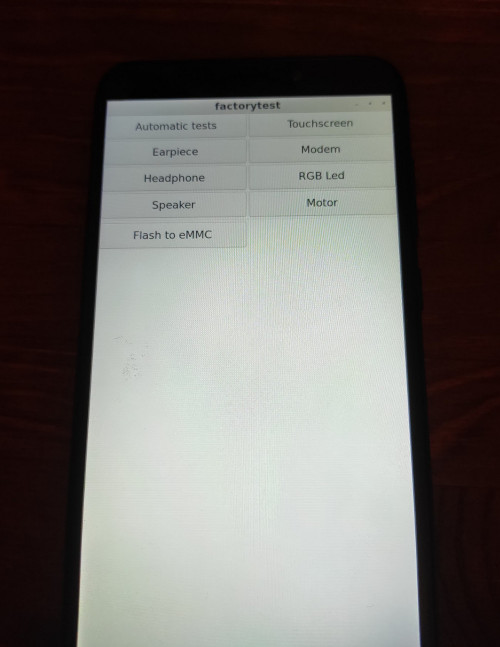
These issues were non-existent when I did install a proper operating system to
the phone, so I suspect there were actually some bugs in factorytest.
Experiencing bugs seems to be consistent with other users' experiences.
Distribution
Now that we've got the phone powered up, we have some decisions to make. What Linux distribution do we want to install on the phone? Furthermore, what desktop environment do we want use?
The PINE64 wiki has a page listing most of the distributions that are known to work on the PinePhone, and the choices are surprisingly diverse. On one end of the spectrum, there's GloDroid, which is a port of Android to the PinePhone. That might seem like it defeats the purpose of using the PinePhone, but I'm sure it can be used for a use-case similar to dual-booting Windows and Linux. Moving further from Android, we have distributions like Ubuntu Touch which actually use parts of Android to interact with the underlying phone, but implement a full Linux userland and display server on top of that. Personally, I think this is a really cool approach for making ordinary Android phones more useful, and you can read more about the approach here. Finally, we've got regular mainline Linux, with both desktop-oriented and mobile-oriented distributions. You can run Gentoo, Fedora, Arch Linux ARM, etc. on the Pinephone, or you can opt for PostmarketOS (Alpine-derivative) or Mobian (Debian-derivative).
There are some options that might not fit into my arbitrary "spectrum" idea, like Sailfish OS. I don't know enough about it to say where it falls. Regardless, I hope you're taking away that with an open design, you have lots of options.
One last choice I want to mention is the SqueakPhone, which appears to be based on PostmarketOS, but the userland is almost entirely written in Smalltalk.
It's a good time to be hacking on mobile devices. We might not be in the golden age, but we're certainly marching toward it.
As much as I like running Gentoo on most of my machines, I figured that would be
a bit much for me. It also doesn't seem like a good idea to constantly be
compiling things from source on my phone, which probably doesn't have great
thermals (and I assume it would take a few days to compile e.g. Firefox unless I
took the time to properly set up distcc.)
So I went with PostmarketOS. I admire the design of Alpine Linux, and I think that PostmarketOS is the project making the most progress in the mobile Linux space. Now, PostmarketOS comes with several options for a desktop environment. The three I consider to be the "main" options are Sxmo, Plasma Mobile, and Phosh. Sxmo is basically a mobile-oriented dwm fork. I'm a former dwm user and current AwesomeWM user, but running a tiling window manager on my phone seems a bit much, even for me. And in the Gnome versus KDE footballing5, I like Gnome better, and I prefer GTK+ over Qt, so I went with Phosh.
Once you know what you want to install on your PinePhone, the process is straightforward. Flash a distribution image to an SD card, pop it into the phone, and power it on. From there, you can install it to EMMC.
Storage
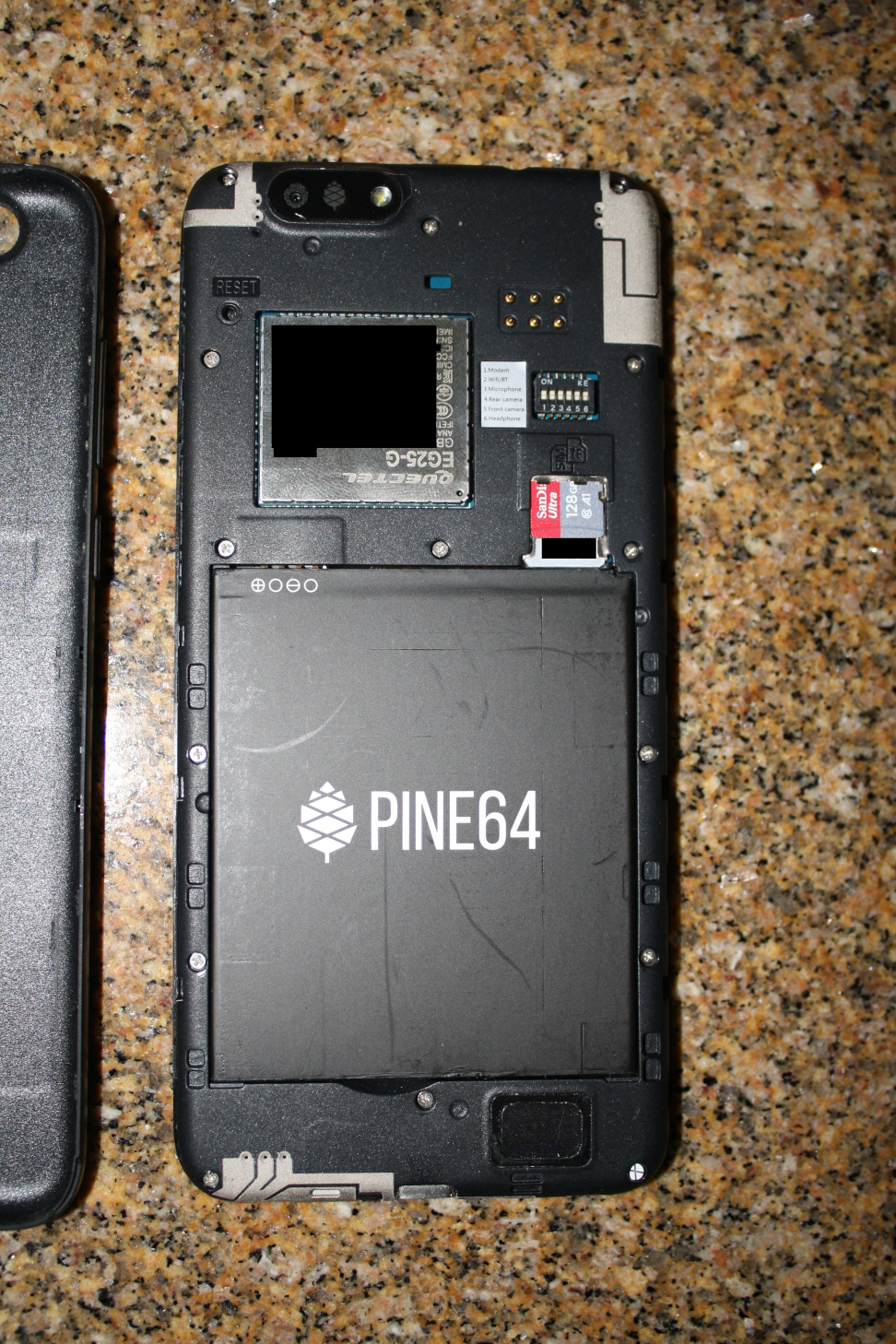
The internal EMMC on the PinePhone I have is 16GB (later models have a 32GB
EMMC). My music folder far exceeds 16GB, so I bought an SD card to use as extra
storage. Unlike Android, a regular Linux distribution gives you some flexibility
with how you split storage up across the various storage devices. I set up a
LUKS-encrypted ext4 filesystem on the SD card and threw a script into local.d to
decrypt it and mount it on top of /home. I haven't had a single issue with it,
so we're already doing much better than Android. I can store basically whatever
the hell I want on my phone without worrying about space constraints.
Mobile Data
Mobile data worked surprisingly well, with minimal tinkering. At the time,
PostmarketOS wasn't able to automatically detect the APN for my carrier, but the
PINE64 wiki has a list of APN settings for common carriers. Once I set it up to
communicate with NXTGENPHONE, I was able to kill the Wi-Fi connection and hit
icanhazip.com. I knew it worked because I was given an IPv6 address in response.
First time that's happened to me.
I was also able to pull out my PinePhone and pull up a picture of Fred Durst at the Thanksgiving dinner table6, far away from my house, so I was able to test out mobile data "in practice" fairly early into my PinePhone usage.
Software
While we can run Android applications on GNU/Linux, it would defeat the purpose of using this phone to run Android applications for everything. So, soon after I'd verified all was working, I put together a list of the packages that I had installed on my old phone, and figured out what the analogs were on PostmarketOS.
| Android App | PostmarketOS package | Note |
|---|---|---|
| andOTP | numberstation | a0; |
| AntennaPod | a0; | Dropped; I'll just use an RSS reader. |
| AnySoftKeyboard | squeekboard | a0; |
| App Manager | a0; | Android-specific application. |
| AudioFX | a0; | Unused on Android. But there are plenty of post-processing applications for Pipewire. |
| Aurora Store | a0; | Android-specific application. |
| BackgroundRestrictor | a0; | Android-specific application. |
| Browser | a0; | Unused on Android. |
| AVNC | tigervnc | Unused in PostmarketOS. |
| Calculator | gnome-calculator; calc | a0; |
| Calendar | Org mode | a0; |
| Calendar Import-Export | Org mode | Unused in PostmarketOS.7 |
| Camera | Megapixels | a0; |
| Clock | gnome-clocks | a0; |
| Contacts | gnome-contacts | a0; |
| Conversations | dino | Unused in PostmarketOS.8 |
| Discord | gtkcord4 | Discord sucks and I hate it, but some friends are only reachable on there, so I have to settle. |
| a0; | Unused on Android. | |
| F-Droid | a0; | Android-specific application |
| FFUpdater | a0; | Android-specific application |
| Files | Portfolio, dired, ls(1) | a0; |
| Firefox | Firefox | a0; |
| FM Radio | a0; | Not replaceable.9 |
| Gallery | gnome-photos | a0; |
| K-9 Mail | Geary | a0; |
| Libera PRO | Evince | Could use Calibre, but I actually do most of my e-book reading on a rooted Nook now. |
| Messaging | Chatty | a0; |
| MuPDF mini | Evince | a0; |
| Music | Music Player Daemon | a0; |
| NewPipe | mpv, yt-dlp | a0; |
| Obsqr | Megapixels | a0; |
| Offline Calendar | a0; | Android-specific application. |
| OpenKeychain | gpg(1) | a0; |
| Orbot | torsocks | a0; |
| Orgzly | a0; | Not needed as I can run GNU Emacs natively on PostmarketOS. |
| OsmAnd~ | mepo | a0; |
| Password Store | pass | a0; |
| Phone | Calls | a0; |
| Recorder | ffmpeg | a0; |
| RetroArch | RetroArch | Unused in PostmarketOS.10 |
| Settings | a0; | Android-specific application. |
| Shattered Pixel Dungeons | a0; | Dropped. |
| Signal | a0; | a0; |
| Slide | a0; | Dropped. |
| Syncthing | Syncthing | a0; |
| Termux | gnome-console | a0; |
| Tiny Tiny RSS | gnome-feeds | I don't currently use RSS synchronization. |
| Tusky | Tootle | a0; |
| wallabag | a0; | Dropped. |
| Wikipedia | a0; | Dropped. |
Excluded from this list are two banking applications which are effectively irreplaceable, as they employ some additional anti-tampering and security measures. I still keep a burner phone around for this – even though I'm able to do a lot from the website, there are a few things like digital check deposit and paying rent through Zelle that I can't do without the mobile app.
I keep the burner phone in a Faraday bag at home, but I did carry my old Android phone around on me while I was starting to use the PinePhone – always in airplane mode, occasionally connected to a Wi-Fi hotspot. I took the approach of weening myself off one and onto the other.
I still occasionally carry around the old phone because mepo is nowhere near OsmAnd~ in terms of maturity, so the PinePhone isn't very useful for land navigation. The camera's also a little better on the Honor 5X.
There are also a few odd things that aren't in the table because in Android, they're built into the system. In particular, I've been using grim to take screenshots and wlsunset to set the screen color temperature.11
I'll get into the specifics of using some of these applications (like GNU Emacs) later in the article.
Pain Points
As you might expect, I've encountered several issues while daily-driving the PinePhone. Most of these would make the PinePhone a non-starter for anyone with a relatively normal use-case. But for me, they're inconveniences I'm willing to live with. Some have been resolved by now, and I'm hopeful that they continue to be addressed as time goes on.
Modem: Frequent disconnects, not receiving calls
The modem has been the single most frustrating part about using the PinePhone. For background: the PinePhone uses a Quectel EG25-G modem, which is effectively a SOC of its own, running a little embedded Linux distribution distinct from the rest of the PinePhone. So if the firmware is dogshit (which it is, if you're using the firmware from Quectel), it can run hot or draw a stupid amount of power while the main SOC is in standby and drain the battery.
Fortunately, Biktorgj maintains a free firmware implementation for the EG25-G which is much better. Battery life on standby went from a couple of hours to a whole day when I made the switch.
Regardless of firmware, I was having an issue where the modem would disconnect
from the phone every couple of minutes, which was very frustrating. This is
resolved by using udev to set ATTR{power/control} to on instead of auto, at a
cost in power consumption, but the usability is worth the hit in battery life.
Having a distinct modem daughter card seems to be a design feature, at least in the eyes of Purism, because it means that "those network components are fully isolated from the main board and cannot freely access the rest of the system," indicating that it's "an important privacy feature." It comes with it's costs, though.
Biktorgj's project only addresses parts of the firmware, and not the baseband implementation. You still need to install ADSP firmware blobs for that. And, humorously, Quectel doesn't seem to officially publish them, so the PINE64 community just maintains a collection of four different versions with varying levels of stability depending on the cellular carrier being used.
One issue that I have yet to solve is that, if the phone is sitting in standby for a while (say, overnight), I can't receive or make calls. But it's inconsistent. For example, at the time of writing this, I'd had my phone in standby without restarting for several nights, but I could make a call just now. It's hard to gleam what's going on from the logs, too.
Jul 30 02:02:34 theta daemon.info [2179]: <info>  [modem0/bearer1] verbose call end reason (3,1056): [cm] lrrc-connection-establishment-failure-timer-expired
Jul 30 02:02:34 theta daemon.info [2179]: <info>  [modem0] state changed (connected -> registered)
Jul 30 02:02:34 theta daemon.info [2179]: <info>  [modem0/bearer1] connection #1 finished: duration 22362s, tx: 285780 bytes, rx: 1471594 bytes
...
Jul 30 06:02:43 theta daemon.info [2179]: <info>  [modem0/bearer1] verbose call end reason (3,1034): [cm] esm-sync-up-with-nw
Jul 30 06:02:43 theta daemon.info [2179]: <info>  [modem0] state changed (connected -> registered)
Jul 30 06:02:43 theta daemon.info [2179]: <info>  [modem0/bearer1] connection #2 finished: duration 14407s, tx: 172 bytes, rx: 555 bytes
For me, this isn't a huge problem. 90% of the time I'm getting a phone call, it's a robot asking me about my car's warranty. If it's someone actually trying to get a hold of me, they're likely to leave a voicemail, which I am alerted to even if the phone's in this unusual state of being unable to receive calls.
So running custom firmware on the modem is currently the best way to have a moderately-usable modem. With the news that Quectel could potentially be locking down their hardware and preventing users from flashing their own firmware, I'm worried the usability of the PinePhone will be kneecapped in the somewhat near-future.
The sad thing is, this modem seems to be the best supported piece of hardware in ModemManager now, and I don't think we'll see this much work on other modems for a long while. This Quectel piece of shit will probably be the only usable option in e.g. PostmarketOS for the foreseeable future.
Occasional Non-Wake from Suspend
My phone will occasionally refuse to wake up from standby. That is, when the phone goes to sleep because the screen's been off for 2 minutes, it suspends. But the power button doesn't wake it, nor does the phone respond to the TTYEscape key sequence.
I configured syslogd to write to disk instead of shared memory to get some
indication of what might be going on, but since doing the issue hasn't presented
itself. I suspected that gnome-power-manager was failing to register ACPI
wake-up events in some cases, but I don't see any messages about ACPI in my
dmesg output. Seems like PSCI is what's being used, which tracks since the first
version of the standard to acknowledge ARM was only released a decade ago. I
don't know enough about PSCI to hypothesize about what might have been going on.
What matters is that it's been a difficult problem to track down.
Suspend Prevents Alarm from Going off
Rarely a problem for me since I plug my phone in at night and don't have it
configured to suspend when on AC power, but if the phone is suspended, there's
nothing to wake the phone up to check for alarms you've set in gnome-clocks. The
effect is that your alarm isn't going to go off.
Fortunately, the modem is almost always running and is able to wake the phone, so if you're using Biktorgj's firmware, you can send the modem a text message to schedule a wake-up call. It's a nice solution to a pretty unfortunate problem.
There are some papers on how power management is done in Android-land, which makes me think that user space alarms could work in the presence of an automatic suspend framework. In fact, the RTC available on the PinePhone is sufficient to trigger a wake event, but configuring it seems to be quite user-unfriendly. I hope that we see more libraries and software development kits for Linux that take advantage of mobile hardware capabilities.
Battery Life
As stated above, battery life out-of-the-box is awful. It's made much better by installing Biktorgj's modem firmware, but is still somewhat underwhelming. I've seen this attributed to the phone's design consisting of four separate chips.
The PinePhone Keyboard comes with a 6000mAh internal battery to effectively extend the battery capacity of the PinePhone. I haven't purchased one yet.
What I have done is spend about $40 on a 40000mAh power bank from Anker. That was a good investment, since I can charge my PineBook and other devices as well. I just keep that and a spare USB-C cable in my bag (which I bring with me practically everywhere), and I haven't had any issues.
I'm hopeful that PINE64 eventually releases a back cover that supports a higher-capacity battery (maybe 5000mAh). My hesitancy with the keyboard is that I'm worried it would be too chunky. I wouldn't expect a slightly fatter battery to make it difficult to fit the phone in my pocket, but a phone with a keyboard attached might be a tight fit.
Mobile hotspot not working
Non-issue as of PostmarketOS 21.12. The hotspot works fine, and I use it extensively to connect my PineBook to the internet while on the go.
Even in 21.06, it wasn't a terrible issue to have to work around. The issue was that I couldn't connect to the internet directly, but I could still connect to the PinePhone, so SSH tunneling and a SOCKS5 client were all I needed to browse the web or check my email. It was apparently a kernel issue.
On-screen Keyboard
This is a difficult issue to put into words, and as such I've had a hard time looking around for mention of it on the bug tracker or elsewhere.
Sometimes, when typing with Squeekboard (the on-screen keyboard that comes with Phosh), I'll press a key once and two characters will be inserted – as if the phone registered it as two taps in quick succession.
A solution I'd like to try is to patch Squeekboard and have it keep a timer for determining how much time there elapses between key press events. If the pause is too short, then we'd drop the second key press. Squeekboard seems to be mostly written in Rust, so I find that to be an enticing quality-of-life improvement project, but I think I've done enough technical work in this post already, so I'll do it another time.
Bluetooth Audio
Bluetooth audio remains a pain point, and an elusive one at that. It works well
when attempting to troubleshoot, but seems to bug out when I actually use it.
The Arch Linux Wiki has a page on troubleshooting my situation, which is that
"[c]onnecting works, but there are sound glitches all the time." In my case, I
have no issues connecting to my car's stereo system, for example, but 90% of the
time I will have audio buffer overruns that cause the audio to pause every
second or so. It is infuriating to have to listen to. I mostly notice this
behavior with mpd, and I have a procedure for "fixing it."
nice -11 mpdmpc playpkill mpdnice -11 mpd- Music starts playing without hiccups.
I'm not sure why it works, or if this indicates that the issue is in mpd rather
than the Bluetooth stack. Regardless, it's behavior I would expect to "just
work."
CyberSeb on the PINE64 forum has a post for configuring the Bluetooth stack to
work better, and I have some recollection of the second step working well, but
as of late the script I have to run those commands (included below) no longer
works. It tends to fail at pactl set-port-latency-offset, either because
BLUEZCARD isn't defined, or something else. The error messages aren't especially
descriptive.
I was only doing the second step because, for some time, I was convinced that my phone wasn't running Pulse. I really thought it was on Pipewire, but it seems my memory failed me.
theta:~$ sudo apk add pipewire-pulse
ERROR: unable to select packages:
  pipewire-pulse-0.3.51-r1:
    breaks: postmarketos-ui-phosh-18-r3[!pipewire-pulse]
    satisfies: world[pipewire-pulse] gnome-settings-daemon-42.1-r0[pulseaudio] postmarketos-base-ui-gnome-1-r3[pulseaudio] gnome-session-42.0-r1[pulseaudio-alsa]
Even if Pulse is installed, I'm hesitant to screw with its niceness because it
does not have a reputation of being resourceful. I'm wondering if these issues
would go away if I did switch over to using Pipewire, but the error from apk
above makes me think that it would be a hard nut to crack. I've tried setting a
default fragment size in Pulse as a more reasonable workaround while I wait
for Pulse to eventually die a slow and painful death. So far, it hasn't fixed
the mpd problem, and I'm not especially inclined to troubleshoot further.
Cross Compiling Woes
PostmarketOS maintains a tool for cross-compiling packages (among other things)
called pmbootstrap, which I find to be quite nice. pmbootstrap init will set you
up with a chroot pinned at a specific version of PostmarketOS (or edge) for a
specific device and architecture, and from there you can use pmbootstrap build
to cross-compile packages for installation on the PinePhone. Cross-compiling can
be a bit slow (it literally took a day to compile Emacs PGTK) because, in most
cases, the toolchain will be running under QEMU's user space emulator, but it's
probably better than melting your phone trying to compile things on the device.
I've had a few sour experiences with cross-compiling, but the issue always came
down to poor quality control in Alpine's community repository rather than the
cross compiling workflow not being good. Before learning about numberstation, I
was trying to use gnome-authenticator, and the version available in apk was
completely unusable. I tried to build a newer version, which ended up being
incompatible with the libraries installed in my version of PostmarketOS, and I
tried to build a really old version (before the application was rewritten in
Rust), which didn't work either. I ended up cross-compiling otpclient with
little friction.
Lack of software
A lot of what I want to do is well-supported by existing Linux packages, but there are a couple of blind spots like Signal. In theory, I can use Pidgin and signald, but I haven't been bothered to try it.
In these cases, the solution is to write your own software.
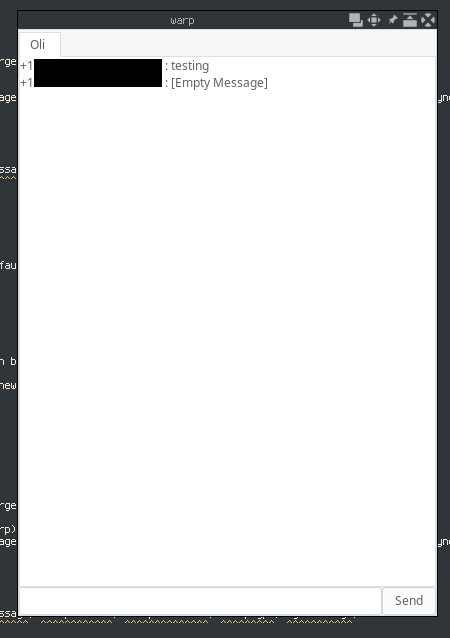
Being able to do this without the complexity (and Java requirement) of the Android SDK is the biggest appeal of running a Linux phone to me. So much so that I've got an entire section dedicated to it later in this article.
The Good Parts
I started off talking about the problems that come with using a device like the PinePhone, but I've continued to use it because for me, the benefits far outweigh the issues, which I'll outline below.
Emacs on Mobile
This is the "killer feature" for me.
You might expect Emacs on mobile to be little more than a novelty, but the only
application I think I use more than it is Firefox. I've now got a friction-less
org-capture device in my pocket. If an idea pops into my head, or if someone
tells me to do something, I just pull out the PinePhone, M-<RET> TODO and type
it in. That note then makes its way to my other machines by the magic of
Syncthing. Another use for mobile Emacs is that, sometimes, I'll cuddle up to my
partner, and they'll fall asleep on me, but I really want to work on a blog
post. If this happens, I can use TRAMP to edit the draft over SSH. In fact, I've
literally edited this blog post from my bed while Oli was asleep on me, using
mobile Emacs.
The other uses are honestly pretty mundane. I like being able to use dired to
browse the local filesystem; I can use Malyon to play Zork & friends on the go;
and if I'm really bored, I can just start hacking on Scheme or Elisp code while
I'm sitting on the train.
I was anticipating wanting to pick up evil-mode, thinking it would be better for
use with an on-screen keyboard, but the Squeekboard terminal layout is actually
quite good for Emacs-ing. I can whip around a buffer at about a fifth my speed
on my workstation, which is pretty good for only using a fifth of my God-given
fingers. Icons (I don't disable tool-bar-mode in my mobile configuration) make
for a slightly nicer touch input experience, too.
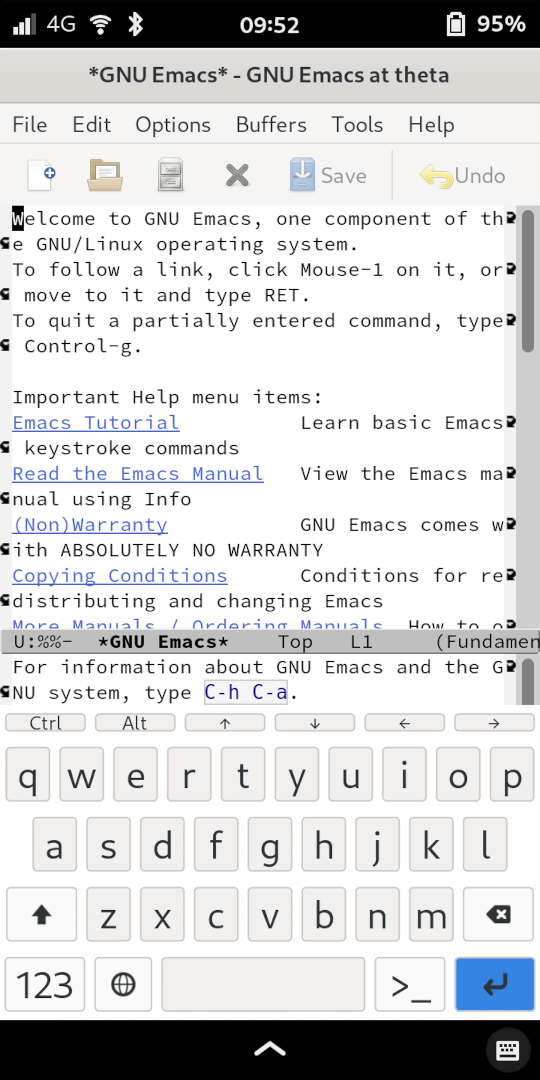
It was a little difficult to get things running. Emacs is in the PostmarketOS
repos.. except the package sucks because it's the old X11 Emacs, and Phosh is
Wayland, so it has to run through Xwayland and fractional scaling makes it a
blurry mess. To resolve that, I ripped a ton of code out of the APKBUILD and
pointed it at a tarball for Emacs master (which has had the PGTK branch merged).
# Maintainer: Natanael Copa <[REDACTED]>
# Contributor: Timo Teräs <[REDACTED]>
pkgname=emacs
pkgver=29.0
pkgrel=7
pkgdesc="The extensible, customizable, self-documenting real-time display editor"
arch="all"
depends="emacs-nox"
url="https://www.gnu.org/software/emacs/emacs.html"
license="GPL-3.0-or-later"
makedepends="
    autoconf
    automake
    gawk
    gmp-dev
    gnutls-dev
    harfbuzz-dev
    jansson-dev
    linux-headers
    ncurses-dev
    ncurses-libs
    texinfo
    "
subpackages="$pkgname-doc $pkgname-nox"
source="emacs-$pkgver.tar.xz"

case $CARCH in
    riscv64|s390x)
        # limited by librsvg (rust)
        _docdir="nox"
        ;;
    *)
        makedepends="
            $makedepends
            alsa-lib-dev
            fontconfig-dev
            giflib-dev
            glib-dev
            gtk+3.0-dev
            libgccjit-dev
            libjpeg-turbo-dev
            libpng-dev
            librsvg-dev
            libxaw-dev
            libxml2-dev
            libxpm-dev
            pango-dev
            tiff-dev
            "
        subpackages="
            $subpackages
            $pkgname-gtk3
            "
        _docdir="gtk3"
        ;;
esac

prepare() {
    default_prepare
    ./autogen.sh
}

_build_variant() {
    cd "$builddir/$1"
    shift
    CFLAGS=-fno-pie \
    LDFLAGS=-no-pie \
    ./configure \
        --build=$CBUILD \
        --host=$CHOST \
        --prefix=/usr \
        --sysconfdir=/etc \
        --libexecdir=/usr/lib \
        --localstatedir=/var \
        --with-gameuser=:games \
        --with-gpm \
        --with-harfbuzz \
        --with-json \
        "${@}"

    make $_extra
}

_build_gtk3() {
     _build_variant gtk3 \
        --with-pgtk \
        --with-xft \
        --with-jpeg=yes \
        --with-tiff=no \
        --with-gif=ifavailable \
        --with-xpm=ifavailable
}

        # --with-x-toolkit=gtk3 \

_build_nox() {
    _build_variant nox \
        --without-sound \
        --without-x \
        --without-file-notification
}

build() {
    mkdir -p nox
    mv ./* nox || true

    case "$CARCH" in
    riscv64|s390x)
        # limited by librsvg (rust)
        _build_nox
        ;;
    *)
        cp -a nox gtk3
        _build_nox
        _build_gtk3
        ;;
    esac
}

package() {
    mkdir -p "$pkgdir"
}

doc() {
    depends=""
    mkdir -p "$subpkgdir"
    cd "$builddir"/"$_docdir"
    make DESTDIR="$subpkgdir" install
    # remove conflict with ctags package
    mv "$subpkgdir"/usr/share/man/man1/ctags.1.gz "$subpkgdir"/usr/share/man/man1/ctags.emacs.1.gz
    # only keep info and man directories, all other is in the specific package
    rm -rf "${subpkgdir:?}"/usr/bin \
        "$subpkgdir"/usr/lib \
        "$subpkgdir"/usr/share/appdata \
        "$subpkgdir"/usr/share/applications \
        "$subpkgdir"/usr/share/emacs \
        "$subpkgdir"/usr/share/icons \
        "${subpkgdir:?}"/var \
        "$subpkgdir"/usr/lib/systemd
}

_subpackage() {
    cd "$builddir/$1"
    make DESTDIR="$subpkgdir" install

    # remove conflict with ctags package
    mv "$subpkgdir"/usr/bin/ctags "$subpkgdir"/usr/bin/ctags.emacs
    rm -rf "$subpkgdir"/usr/share/info \
        "$subpkgdir"/usr/share/man

    # fix user/root permissions on usr/share files
    find "$subpkgdir"/usr/share/emacs/ -exec chown root:root {} \;
    find "$subpkgdir"/usr/lib -perm -g+s,g+x ! -type d -exec chmod g-s {} \;
    # fix perms on /var/games
    chmod 775 "$subpkgdir"/var/games
    chmod 775 "$subpkgdir"/var/games/emacs
    chmod 664 "$subpkgdir"/var/games/emacs/*
    chown -R root:games "$subpkgdir"/var/games

    # remove useless systemd user file
    rm -rf "$subpkgdir"/usr/lib/systemd
}

nox() {
    pkgdesc="$pkgdesc - without X11"
    depends="
        !emacs-gtk3
        !emacs-gtk3-nativecomp
        !emacs-x11
        !emacs-x11-nativecomp
        "
    _subpackage nox
}

gtk3() {
    pkgdesc="$pkgdesc - with GTK3"
    depends="
        !emacs-gtk3-nativecomp
        !emacs-nox
        !emacs-x11
        !emacs-x11-nativecomp
        desktop-file-utils
        hicolor-icon-theme
        "
    _subpackage gtk3
}

sha512sums="
20c96e4485b9acbc5c9049bca9b4d9675cd5f4062cd04a9abde4fb7088c7dc55e3bf473acce8f447825c0c1fd9a5def23623d0219bc0353b31892a0cc23f7884  emacs-29.0.tar.xz
"
There is no Emacs 29.0 (yet, at the time of writing this), that's just so apk
knows that this is newer than what's in the repositories.
And if you find the code snippet incomprehensible, don't worry, because I've got a gentler introduction to Alpine packaging later in this article.
YouTube on Mobile
I was a NewPipe user when I was using Android. I'd frequently find it unusable,
and the times it was usable, I'd still get annoying toasts warning me of errors,
just about every time I watched a video. The F-Droid package didn't keep up with
YouTube cat-and-mouse game as quickly as youtube-dl did. I always thought about
how nice it would be to use mpv and yt-dlp just like I do on desktop, and that's
now a reality.
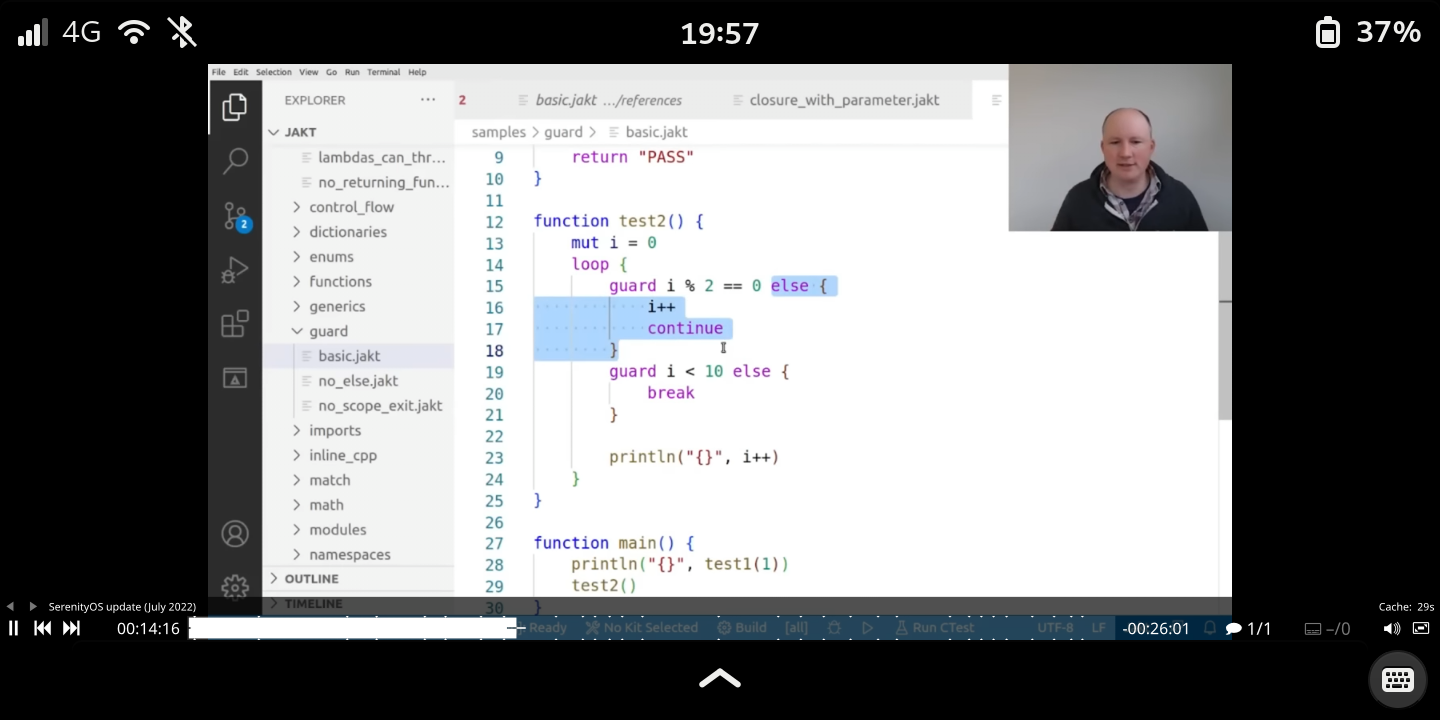
I get the video URLs from RSS and invoke mpv from the terminal. I find it
convenient. The only issue I had is that the screen blanks automatically even
when a video is playing, but this is easily remedied by prefixing mpv with
gnome-session-inhibit --inhibit idle.
Better Music Player
LineageOS included the old Cyanogenmod Music app Eleven, and that's what I used when I was on Android. I didn't see a purpose in using any other music player since they all seem to use the same Android APIs and, hence, all suck as much as Eleven does. Among other things, it cuts out frequently (presumably the process getting killed due to memory pressure), and it can't even load a damned jpeg.
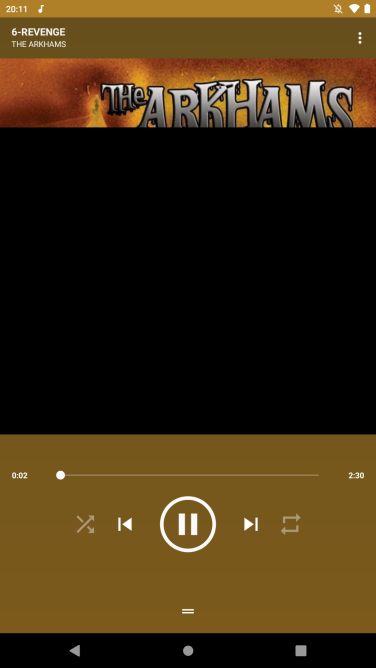
So I was quite happy to be able to use mpd to listen to music on the PinePhone.
My entire library's managed with Syncthing.
Running scripts, cron, other automation
Another "killer feature" is just being able to automate things with bash and
cron the way I would on desktop. One pain point I remember particularly when I
was using Android was manually adjusting the screen color temperature in
settings. Now I can just use cron to run wlsunset at a particular hour.
I suppose that's the only example that's worth mentioning. I haven't leveraged it as much as I could have (but I expect to in the future.)
Convergence
A selling point of the PinePhone is convergence, enabling you to plug your phone into a monitor and keyboard (over USB-C), and use it as if it were a desktop computer. I haven't taken advantage of this yet, but I can SSH into my phone. That's already far better than what I can do on Android, and it's enough for me to be happy – just being able to pull/push files over rsync, run shell commands over SSH using an actual keyboard…
The only thing I wish I could do is send SMS over SSH and get notifications from
my phone on my workstation. SMS messages can (theoretically) be sent using
mmcli, and I'm not sure about notifications. Perhaps I've made a programming
project for myself.
Run Linux Desktop Applications
Nearly all of the above points boil down to the PinePhone enabling me to run Linux desktop applications on mobile. Consistency is nice. Who would have known!
Software Development
I consider this to be one of "The Good Parts", but it ended up being big enough to take up a section of its own.
Software Stack Freedom
If you're at least mildly familiar with Android, you know that the Java ecosystem is nearly unavoidable if you're doing application development for the platform.12 The NDK enables application developers to write code in other languages (provided they "compile down" to machine code) but it isn't practical to write an entire application this way, as NDK code is limited in the ways it can interact with Android's APIs. Furthermore, the Android SDK is a pain in the ass to use if you're not using Google's IDE. It's doable, and I have done it in the past, but I got frustrated before I could set up an emulator for improving the feedback loop. I was literally pushing to my device via adb on every build if I wanted to experiment with something. That said, it is easy to understand why it is this way. Google (and Apple) want to have uniformity across their platforms' third-party applications, so they impose strong opinions (you must use our UI framework, you must use our Java APIs). Comparatively, the applications that run on my PinePhone are literally the same applications that run on my workstation. I can use any language or libraries I want, provided they support AArch64. I can develop and test on my workstation, and then push it to the PinePhone with high confidence that it will work as intended.
I've been writing my applications in Rust with gtk-rs and libhandy. There's been
a (somewhat recent) distinction between "application programming languages" and
"systems programming languages." Rust falls into the latter. The distinction is
somewhat arbitrary as you can write an application in assembly, but the reason
it's come up in recent years is because people want a way to describe languages
that (1) aren't interpreted or VM languages and (2) don't have a convenient
garbage collector. These sorts of language seem to work quite well for a
resource-constrained environment like the PinePhone, even if it is somewhat more
difficult than using something like Python or Ruby.
Using Rust is perhaps a bit overkill. I'm sure Vala would have been a good choice, too, since it compiles to C, but I went with Rust because I'm more comfortable with it and it has a ecosystem of libraries for the sorts of things I want to do.
So that's all I have to say about the language decision, but there's the decision of UI toolkit too. I went with GTK3 and libhandy: the classic GNOME UI toolkit and Purism's supporting library for adaptive, mobile-friendly layouts and widgets. But that isn't the only option available. Still in GNOME land, there is GTK4 and libadwaita, which I'll probably be using in the near future. I'm just a little slow to start using cool new things. There are many more choices on the Plasma Mobile side of the house: Kirigami, MauiKit (built on top of Kirigami), plain QtQuick, or Sailfish OS's Silica. While GTK and QT are the leading frameworks, I was keeping a close eye on pods, a PinePhone-oriented application using Rust's iced, which is neither GTK nor QT. Unfortunately, it looks to have since stagnated. But mepo, a maps application, is a surprisingly pleasant mobile experience and is written just in SDL.
As an aside, I'd like to experiment with some immediate-mode UI frameworks on the PinePhone. GTK is relatively performant, but I'm curious about whether something like egui would be "snappier". Hell, maybe it would be interesting to try and write my own UI framework.
"Tunes", an MPD Client for Rust
To demonstrate the GTK3 and libhandy combo, I decided to write the minimum viable product of an application I want on my PinePhone that, to my knowledge, doesn't exist yet. A touch-friendly GTK+ MPD client.
Yes… I've been using mpc in the terminal emulator since I got the phone. It's
not as pleasant when you don't have a real keyboard, so this application will
theoretically improve my quality-of-life.
But, because I don't want this post to take any longer than it already has, I'm just going to write about what I could get done in a few weeknights. It's a single-file, and fairly self-contained.
Alright, Let's See the Code
It's a few hundred lines and I've dumped it here under a fold since it's a few
hundred lines. You can find it on cgit as well, which has the Cargo.toml and all
that you would need to actually build it.
// Copyright © 2021-2022 Jakob L. Kreuze <[REDACTED]>
//
// This file is part of Tunes.
//
// Tunes is free software; you can redistribute it and/or modify it
// under the terms of the GNU Affero General Public License as
// published by the Free Software Foundation; either version 3 of the
// License, or (at your option) any later version.
//
// Tunes is distributed in the hope that it will be useful, but WITHOUT
// ANY WARRANTY; without even the implied warranty of MERCHANTABILITY
// or FITNESS FOR A PARTICULAR PURPOSE. See the GNU Affero General
// Public License for more details.
//
// You should have received a copy of the GNU Affero General Public
// License along with Tunes. If not, see <http://www.gnu.org/licenses/>.
use futures::{channel::mpsc, StreamExt};
use glib::clone;
use gtk::prelude::*;
use gtk::subclass::prelude::ObjectSubclassExt;
use gtk::{gdk_pixbuf, gio, glib, pango};
use libhandy::prelude::*;
use libhandy::{ApplicationWindow, HeaderBar};
use mpd::idle::Idle;
use mpd::Client;
const MPD_HOST: &str = "127.0.0.1:6600";
fn main() {
let application = gtk::Application::builder()
.application_id("space.jakob.Tunes")
.build();
// We have to wait until the `activate` signal is fired before we can do our
// setup.
application.connect_activate(|app| {
// Our event-handling code will look a bit like what's common in SDL
// with their `SDLPollEvent` interface, in the sense that we'll have all
// of the different sub-systems of this application notify the main
// event loop by way of a channel.
let (sender, mut receiver) = mpsc::channel(1024);
// Load all of the mobile UI support code from `libhandy`.
libhandy::init();
// `mpd` will notify us of events. Let's spin up a thread to listen for
// those notifications, and shuttle them through a channel as they
// arrive.
std::thread::spawn(clone!(@strong sender => move || {
let mut conn = Client::connect(MPD_HOST).unwrap();
while let Ok(_subsystems) = conn.wait(&[mpd::idle::Subsystem::Player]) {
let mut sender = sender.clone();
sender
.try_send(StateUpdateKind::MpdEvent)
.expect("Couldn't notify thread");
}
}));
// We'll connect to the MPD daemon here so we can populate the UI with
// some information from the current state.
let mut conn = Client::connect(MPD_HOST).unwrap();
// We'll have two "views" in our application: one for viewing and
// manipulating the current `mpd` queue, and another for searching for
// songs to add to the queue. In GTK, we can handle switching between
// these different views using a Stack.
let stack = gtk::Stack::new();
stack.set_expand(true);
let song_info = SongInfo::new(sender.clone());
stack.add_named(song_info.as_ref(), "current_song");
stack.set_child_title(song_info.as_ref(), Some("Now Playing"));
stack.set_child_icon_name(song_info.as_ref(), Some("audio-speakers-symbolic"));
let query_info = QueryInfo::new(sender.clone());
stack.add_named(query_info.as_ref(), "query_songs");
stack.set_child_title(query_info.as_ref(), Some("Search Database"));
stack.set_child_icon_name(query_info.as_ref(), Some("system-search-symbolic"));
// The `HeaderBar` is a GTK concept that libhandy plays nicely with. On
// desktop, the elements for switching stack views will show up there.
// On mobile, it will show up in a `ViewSwitcherBar` at the bottom.
let header_bar = HeaderBar::builder()
.show_close_button(true)
.title(&header_title(&mut conn).unwrap())
.build();
let view_switcher_title = libhandy::ViewSwitcherTitle::builder()
.title("Tunes")
.stack(&stack)
.build();
header_bar.add(&view_switcher_title);
let view_switcher_bar = libhandy::ViewSwitcherBar::builder()
.visible(true)
.can_focus(false)
.stack(&stack)
.reveal(true)
.build();
// The window needs a single child, so we'll join the header bar, the
// stack, and the view switcher into a single box.
let content = gtk::Box::new(gtk::Orientation::Vertical, 0);
content.set_vexpand(true);
content.add(&header_bar);
content.add(&stack);
content.add(&view_switcher_bar);
// Finally, the window. It's tied to a child, which we made above, and
// the GtkApplication that we declared at the beginning of `main`.
let window = ApplicationWindow::builder()
.default_width(350)
.default_height(70)
.modal(true)
.child(&content)
.build();
window.set_application(Some(app));
window.show_all();
// This isn't perfect (it won't run when the window gets its initial
// size), but this is how we notify that the album art display should be
// resized.
window.connect_configure_event(clone!(@strong sender => move |_, _| {
let mut sender = sender.clone();
sender
.try_send(StateUpdateKind::WindowResizeEvent)
.expect("Couldn't notify thread");
false
}));
// Now that everything's been allocated a window, let's go ahead and
// update the widgets.
song_info
.update(&mut conn)
.expect("Couldn't update song info");
// The following code will fill the search view with every song in the
// database. If you have a music library as big as mine, it will
// negatively impact startup time. This could be done in, for example, a
// worker thread, but I've just omitted it because I don't want this
// example to be more complex than it has to be.
//
// let mut query = mpd::Query::new();
// query.and(mpd::Term::Any, "");
// let songs = conn.search(&query, (0, 65535));
// for song in songs.unwrap() {
// query_info.model.insert(0, &SongObject::new(&song));
// }
// Finally, we'll start the "main event loop" we've been talking about
// in the main context of the application.
let main_context = gtk::glib::MainContext::default();
main_context.spawn_local(async move {
let mut conn = Client::connect(MPD_HOST).unwrap();
while let Some(event_type) = receiver.next().await {
match event_type {
StateUpdateKind::MpdEvent => {
if let Ok(title) = header_title(&mut conn) {
header_bar.set_title(Some(&title));
song_info
.update(&mut conn)
.expect("Couldn't update song info");
}
}
StateUpdateKind::WindowResizeEvent => {
song_info
.update_album_art(&mut conn)
.expect("Couldn't update album art");
}
StateUpdateKind::QueryUpdateEvent(query_string) => {
// Let's not produce massive queries while the user is typing :)
if query_string.len() <= 2 {
continue;
}
// Start from a blank slate.
query_info.model.remove_all();
// Query on all fields, case-insensitively, for the text
// that the user input.
let mut query = mpd::Query::new();
query.and(mpd::Term::Any, &query_string);
let songs = conn.search(&query, (0, 65535));
// Insert them all into the model. This is reversed,
// which I don't consider to be a big deal. It's far
// less complex than adding it in order, which you will
// see below in the code that handles the queue.
for song in songs.unwrap() {
query_info.model.insert(0, &SongObject::new(&song));
}
}
StateUpdateKind::QueueDeleteRequest(index) => {
conn.delete(index).expect("Couldn't dequeue song");
}
StateUpdateKind::QueueAddRequest(filename) => {
conn.push_str(filename).expect("Couldn't queue song");
}
StateUpdateKind::PlaybackStateChange(action) => {
dispatch_playback_state_change(&mut conn, action)
.expect("Couldn't queue action");
}
}
}
});
});
application.run();
}
/// Take action on `conn` based on a `PlaybackStateChange` notification
fn dispatch_playback_state_change(
conn: &mut mpd::Client,
action: PlaybackStateChange,
) -> anyhow::Result<()> {
use PlaybackStateChange::*;
match action {
SkipBackwards => conn.prev()?,
SkipForwards => conn.next()?,
Start => conn.play()?,
Stop => conn.stop()?,
Pause => conn.pause(true)?,
}
Ok(())
}
/// Kind of event we can notify the UI future about
#[derive(Debug)]
enum StateUpdateKind {
MpdEvent,
WindowResizeEvent,
QueryUpdateEvent(String),
QueueAddRequest(String),
QueueDeleteRequest(u32),
PlaybackStateChange(PlaybackStateChange),
}
/// A simple action that affects playback state.
#[derive(Debug)]
enum PlaybackStateChange {
Start,
Stop,
Pause,
SkipBackwards,
SkipForwards,
}
/// Produce a short status line for the current state of `conn`.
fn header_title(conn: &mut mpd::client::Client) -> anyhow::Result<String> {
let status = conn.status();
let state_descriptor = match status?.state {
mpd::status::State::Stop => "[STOPPED]",
mpd::status::State::Pause => "[PAUSED]",
mpd::status::State::Play => "[PLAYING]",
};
if let Some(song) = conn.currentsong()? {
Ok(format!(
"{} {} - {}",
state_descriptor,
song.title.unwrap_or_else(|| "Untitled".into()),
song.artist.unwrap_or_else(|| "Untitled".into()),
))
} else {
Ok("Tunes: No Song".into())
}
}
/// View for information about the currently playing song.
struct SongInfo {
container: gtk::Box,
album_art: gtk::Image,
song_text: gtk::Label,
model: gio::ListStore,
}
impl SongInfo {
fn new(sender: mpsc::Sender<StateUpdateKind>) -> Self {
let container = gtk::Box::new(gtk::Orientation::Vertical, 16);
let album_art = gtk::Image::new();
let song_text = gtk::Label::new(None);
song_text.set_justify(gtk::Justification::Center);
song_text.set_line_wrap(true);
song_text.set_line_wrap_mode(pango::WrapMode::WordChar);
container.add(&album_art);
container.add(&song_text);
let action_bar = gtk::Box::new(gtk::Orientation::Horizontal, 16);
action_bar.set_halign(gtk::Align::Center);
let control_previous_song = gtk::Button::from_icon_name(
Some("media-skip-backward-symbolic"),
gtk::IconSize::SmallToolbar,
);
action_bar.add(&control_previous_song);
control_previous_song.connect_clicked(clone!(@strong sender => move |_| {
let mut sender = sender.clone();
sender
.try_send(StateUpdateKind::PlaybackStateChange(
PlaybackStateChange::SkipBackwards,
))
.expect("Couldn't notify thread");
}));
let control_start_song = gtk::Button::from_icon_name(
Some("media-playback-start-symbolic"),
gtk::IconSize::SmallToolbar,
);
action_bar.add(&control_start_song);
control_start_song.connect_clicked(clone!(@strong sender => move |_| {
let mut sender = sender.clone();
sender
.try_send(StateUpdateKind::PlaybackStateChange(
PlaybackStateChange::Start,
))
.expect("Couldn't notify thread");
}));
let control_pause_song = gtk::Button::from_icon_name(
Some("media-playback-pause-symbolic"),
gtk::IconSize::SmallToolbar,
);
action_bar.add(&control_pause_song);
control_pause_song.connect_clicked(clone!(@strong sender => move |_| {
let mut sender = sender.clone();
sender
.try_send(StateUpdateKind::PlaybackStateChange(
PlaybackStateChange::Pause,
))
.expect("Couldn't notify thread");
}));
let control_stop_song = gtk::Button::from_icon_name(
Some("media-playback-stop-symbolic"),
gtk::IconSize::SmallToolbar,
);
action_bar.add(&control_stop_song);
control_stop_song.connect_clicked(clone!(@strong sender => move |_| {
let mut sender = sender.clone();
sender
.try_send(StateUpdateKind::PlaybackStateChange(
PlaybackStateChange::Stop,
))
.expect("Couldn't notify thread");
}));
let control_next_song = gtk::Button::from_icon_name(
Some("media-skip-forward-symbolic"),
gtk::IconSize::SmallToolbar,
);
action_bar.add(&control_next_song);
control_next_song.connect_clicked(clone!(@strong sender => move |_| {
let mut sender = sender.clone();
sender
.try_send(StateUpdateKind::PlaybackStateChange(
PlaybackStateChange::SkipForwards,
))
.expect("Couldn't notify thread");
}));
let model = gio::ListStore::new(SongObject::static_type());
let listbox = gtk::ListBox::new();
listbox.bind_model(
Some(&model),
clone!(@strong sender => move |item| {
let sender = sender.clone();
let box_ = gtk::ListBoxRow::new();
let item = item
.downcast_ref::<SongObject>()
.expect("Row data is of wrong type");
let grid = gtk::Grid::builder().column_homogeneous(true).build();
let remove_individual_song = gtk::Button::from_icon_name(
Some("list-remove-symbolic"),
gtk::IconSize::SmallToolbar,
);
let index = item.property::<u32>("index");
remove_individual_song.connect_clicked(move |_| {
let mut sender = sender.clone();
sender
.try_send(StateUpdateKind::QueueDeleteRequest(index))
.expect("Couldn't notify thread");
sender
.try_send(StateUpdateKind::MpdEvent)
.expect("Couldn't notify thread");
});
grid.attach(&remove_individual_song, 0, 0, 1, 1);
let title_label = gtk::Label::new(None);
title_label.set_line_wrap(true);
title_label.set_line_wrap_mode(pango::WrapMode::WordChar);
item.bind_property("title", &title_label, "label")
.flags(glib::BindingFlags::DEFAULT | glib::BindingFlags::SYNC_CREATE)
.build();
grid.attach(&title_label, 1, 0, 1, 1);
let album_label = gtk::Label::new(None);
album_label.set_line_wrap(true);
album_label.set_line_wrap_mode(pango::WrapMode::WordChar);
item.bind_property("album", &album_label, "label")
.flags(glib::BindingFlags::DEFAULT | glib::BindingFlags::SYNC_CREATE)
.build();
grid.attach(&album_label, 2, 0, 1, 1);
let artist_label = gtk::Label::new(None);
artist_label.set_line_wrap(true);
artist_label.set_line_wrap_mode(pango::WrapMode::WordChar);
item.bind_property("artist", &artist_label, "label")
.flags(glib::BindingFlags::DEFAULT | glib::BindingFlags::SYNC_CREATE)
.build();
grid.attach(&artist_label, 3, 0, 1, 1);
grid.show_all();
box_.add(&grid);
box_.upcast::<gtk::Widget>()
}),
);
let scrolled_window =
gtk::ScrolledWindow::new(gtk::Adjustment::NONE, gtk::Adjustment::NONE);
scrolled_window.add(&listbox);
scrolled_window.set_vexpand(true);
container.add(&action_bar);
container.add(&scrolled_window);
container.show_all();
SongInfo {
container,
album_art,
song_text,
model,
}
}
fn update_album_art(&self, conn: &mut mpd::Client) -> anyhow::Result<()> {
if let Some(song) = conn.currentsong()? {
// If we've been allocated a window, pick the least dimension (width
// or height) and divide that dimension by two to get the size (in
// pixels) that we'll scale the album art to. Otherwise, we default
// to 128.
let album_art_size = std::cmp::min(
self.container
.window()
.map(|x| x.width() / 2)
.unwrap_or(128),
self.container
.window()
.map(|x| x.height() / 2)
.unwrap_or(128),
);
let image_data = conn.albumart(&song)?;
let image_pixbuf = gdk_pixbuf::Pixbuf::from_stream(
&gio::MemoryInputStream::from_bytes(&glib::Bytes::from(&image_data)),
gio::Cancellable::NONE,
)
.ok()
.and_then(|x| {
x.scale_simple(
album_art_size,
album_art_size,
gtk::gdk_pixbuf::InterpType::Hyper,
)
});
self.album_art.set_pixbuf(image_pixbuf.as_ref());
}
Ok(())
}
fn update(&self, conn: &mut mpd::Client) -> anyhow::Result<()> {
self.update_album_art(conn)?;
if let Some(song) = conn.currentsong()? {
let title = song.title.as_deref().unwrap_or("[Unknown]");
let artist = song.artist.as_deref().unwrap_or("[Unknown]");
let album = song
.tags
.get("Album")
.map(|x| x.as_str())
.unwrap_or("[Unknown]");
let text = format!("{}\n{} - {}", title, artist, album);
self.song_text.set_text(&text);
// We'll use `pango` attributes to make the display look nice and
// pretty. Scale the title of the song the most, and still make the
// other info reasonably large.
let attr_list = gtk::pango::AttrList::new();
let mut attr = gtk::pango::AttrFloat::new_scale(2.0);
attr.set_start_index(0);
attr.set_end_index(title.len() as u32);
attr_list.insert(attr);
let mut attr = gtk::pango::AttrFloat::new_scale(1.5);
attr.set_start_index(title.len() as u32 + 1);
attr_list.insert(attr);
self.song_text.set_attributes(Some(&attr_list));
}
self.model.remove_all();
for (i, song) in conn.queue()?.iter().enumerate() {
let index = i.try_into().unwrap();
let object = SongObject::new(song);
object.set_index(index);
self.model.insert(index, &object)
}
Ok(())
}
}
impl AsRef<gtk::Widget> for SongInfo {
fn as_ref(&self) -> >k::Widget {
self.container.upcast_ref()
}
}
/// View for selecting songs to add to the queue.
struct QueryInfo {
container: gtk::Box,
model: gio::ListStore,
}
impl QueryInfo {
fn new(sender: mpsc::Sender<StateUpdateKind>) -> Self {
let container = gtk::Box::new(gtk::Orientation::Vertical, 2);
let query_input = gtk::Entry::builder().visible(true).build();
query_input.connect_key_press_event(clone!(@strong sender => move |widget, _| {
let mut sender = sender.clone();
sender
.try_send(StateUpdateKind::QueryUpdateEvent(widget.text().into()))
.expect("Couldn't notify thread");
gtk::Inhibit(false)
}));
let model = gio::ListStore::new(SongObject::static_type());
let listbox = gtk::ListBox::new();
listbox.bind_model(Some(&model), clone!(@strong sender => move |item| {
let sender = sender.clone();
let box_ = gtk::ListBoxRow::new();
let item = item
.downcast_ref::<SongObject>()
.expect("Row data is of wrong type");
let grid = gtk::Grid::builder().column_homogeneous(true).build();
let add_individual_song =
gtk::Button::from_icon_name(Some("list-add-symbolic"), gtk::IconSize::SmallToolbar);
add_individual_song.set_visible(true);
let filename = item.property::<String>("filename");
add_individual_song.connect_clicked(move |_| {
let filename = filename.clone();
let mut sender = sender.clone();
sender
.try_send(StateUpdateKind::QueueAddRequest(filename))
.expect("Couldn't notify thread");
sender
.try_send(StateUpdateKind::MpdEvent)
.expect("Couldn't notify thread");
});
grid.attach(&add_individual_song, 0, 0, 1, 1);
let title_label = gtk::Label::new(None);
title_label.set_line_wrap(true);
title_label.set_line_wrap_mode(pango::WrapMode::WordChar);
item.bind_property("title", &title_label, "label")
.flags(glib::BindingFlags::DEFAULT | glib::BindingFlags::SYNC_CREATE)
.build();
grid.attach(&title_label, 1, 0, 1, 1);
let album_label = gtk::Label::new(None);
album_label.set_line_wrap(true);
album_label.set_line_wrap_mode(pango::WrapMode::WordChar);
item.bind_property("album", &album_label, "label")
.flags(glib::BindingFlags::DEFAULT | glib::BindingFlags::SYNC_CREATE)
.build();
grid.attach(&album_label, 2, 0, 1, 1);
let artist_label = gtk::Label::new(None);
artist_label.set_line_wrap(true);
artist_label.set_line_wrap_mode(pango::WrapMode::WordChar);
item.bind_property("artist", &artist_label, "label")
.flags(glib::BindingFlags::DEFAULT | glib::BindingFlags::SYNC_CREATE)
.build();
grid.attach(&artist_label, 3, 0, 1, 1);
grid.show_all();
box_.add(&grid);
box_.upcast::<gtk::Widget>()
}));
let scrolled_window =
gtk::ScrolledWindow::new(gtk::Adjustment::NONE, gtk::Adjustment::NONE);
scrolled_window.add(&listbox);
scrolled_window.set_vexpand(true);
container.add(&query_input);
container.add(&scrolled_window);
QueryInfo { container, model }
}
}
impl AsRef<gtk::Widget> for QueryInfo {
fn as_ref(&self) -> >k::Widget {
self.container.upcast_ref()
}
}
// Unfortunately, to use the `ListStore` interface, we'll need to represent our
// data as an actual `glib` object. This is a little hairy in Rust, involving a
// fair bit of boilerplate, but not too terrible.
glib::wrapper! {
pub struct SongObject(ObjectSubclass<imp::SongObject>);
}
impl SongObject {
pub fn new(song: &mpd::song::Song) -> Self {
glib::Object::new(&[
("filename", &song.file.clone()),
(
"title",
&song
.title
.as_ref()
.cloned()
.unwrap_or_else(|| "[Untitled]".into()),
),
(
"artist",
&song
.artist
.as_ref()
.cloned()
.unwrap_or_else(|| "[No Artist]".into()),
),
(
"album",
&song
.tags
.get("Album")
.cloned()
.unwrap_or_else(|| "[Untitled]".into()),
),
])
.expect("Failed to create `SongObject`.")
}
pub fn set_index(&self, idx: u32) {
let private = imp::SongObject::from_instance(self);
private.index.set(idx);
}
}
// These class "implementations" are typically done in a separate
// file/directory. I wanted to keep the example self-contained.
mod imp {
use std::cell::{Cell, RefCell};
use glib::{ParamSpec, ParamSpecString, Value};
use gtk::glib;
use gtk::prelude::*;
use gtk::subclass::prelude::*;
use once_cell::sync::Lazy;
// Object holding the state
#[derive(Default)]
pub struct SongObject {
filename: RefCell<String>,
title: RefCell<String>,
artist: RefCell<String>,
album: RefCell<String>,
pub(crate) index: Cell<u32>,
}
// The central trait for subclassing a GObject
#[glib::object_subclass]
impl ObjectSubclass for SongObject {
const NAME: &'static str = "TunesSongObject";
type Type = super::SongObject;
}
// Trait shared by all GObjects
impl ObjectImpl for SongObject {
fn properties() -> &'static [ParamSpec] {
static PROPERTIES: Lazy<Vec<ParamSpec>> = Lazy::new(|| {
vec![
ParamSpecString::builder("filename").build(),
ParamSpecString::builder("title").build(),
ParamSpecString::builder("artist").build(),
ParamSpecString::builder("album").build(),
ParamSpecString::builder("index").build(),
]
});
PROPERTIES.as_ref()
}
fn set_property(&self, _obj: &Self::Type, _id: usize, value: &Value, pspec: &ParamSpec) {
match pspec.name() {
"filename" => {
let input = value
.get()
.expect("The value needs to be of type `String`.");
self.filename.replace(input);
}
"title" => {
let input = value
.get()
.expect("The value needs to be of type `String`.");
self.title.replace(input);
}
"artist" => {
let input = value
.get()
.expect("The value needs to be of type `String`.");
self.artist.replace(input);
}
"album" => {
let input = value
.get()
.expect("The value needs to be of type `String`.");
self.album.replace(input);
}
"index" => {
let input = value.get().expect("The value needs to be of type `u32`.");
self.index.replace(input);
}
_ => unimplemented!(),
}
}
fn property(&self, _obj: &Self::Type, _id: usize, pspec: &ParamSpec) -> Value {
match pspec.name() {
"filename" => self.filename.borrow().to_value(),
"title" => self.title.borrow().to_value(),
"artist" => self.artist.borrow().to_value(),
"album" => self.album.borrow().to_value(),
"index" => self.index.get().to_value(),
_ => unimplemented!(),
}
}
}
}
Basically, a sizable amount of code to set up these two views: SongInfo, which
is somewhat of a misnomer because it shows more than just information about the
currently-playing song, and QueryInfo, which is the view for searching through
the mpd database. Then there's some mpsc plumbing to get the UI to talk with the
thread that's responsible for talking to mpd. It's a big hunk of code, but I'm
confident it's sufficiently commented that I don't need to re-learn any literate
programming tools to talk about it in this article.
I did all the development for this in Emacs on my primary workstation, keeping in mind that I would eventually be putting this on a mobile phone, but otherwise writing it as I would a desktop application. The feedback loop was much faster than what I had when I was doing Android development all those years ago, since I was literally compiling and running the program on my workstation.
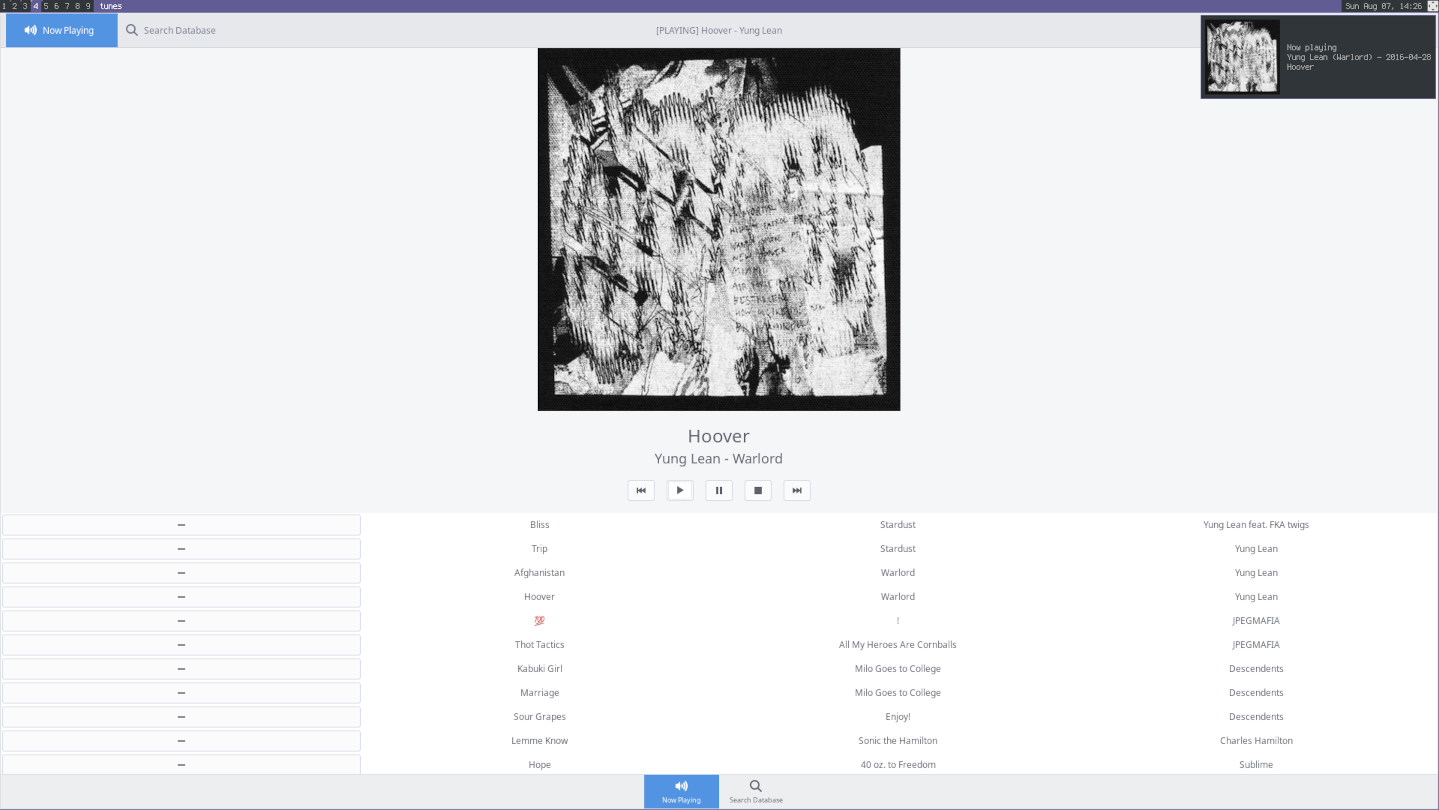
The only part that was really affected by the mobile consideration was with
using a ListStore instead of just adding things into a ListBox. I'm frankly not
sure I did it right, but the intent was to have an application that doesn't
create a thousand labels at once, instead instantiating them as they come into
view. This is by no means a mobile-only consideration, but the PinePhone has an
eighth the memory of my workstation, and I have a big (20G) music collection.
Anyway, the right way to do it is described here, but that book is using GTK4,
so I wasn't able to lift it verbatim.
The rest of it is standard Rust, once you realize that everything in GTK land is
basically an Arc<Mutex<T>>. Closures are a little funny, too, which is why you
see let mut sender = sender.clone() show up so frequently: we can't share the
same mutable reference across multiple invocations of the same closure13
I tried to go against the grain and use regular Rust structs (that implement
AsRef<Widget>) instead of using subclassing, but you can see that I had to do it
anyway to shoehorn the data we got from mpd into the ListStore. I think the
struct-based composition is a little bit nicer to work with.
Once I had the code tested, somewhat optimized, and refactored, I was ready to try it out on the phone.
Building and Installing the Application on PostmarketOS
pmbootstrap comes with a nice hello-world-rust APKBUILD to get you started with
packaging your Rust application.
# Maintainer: Oliver Smith <[REDACTED]>
pkgname=hello-world-rust
pkgver="0.1.1"
pkgrel=0
pkgdesc="Small test program for (cross) compiling rust"
url="https://gitlab.com/ollieparanoid/hello-world-rust/"
arch="all"
license="Unlicense"
makedepends="cargo"
source="https://gitlab.com/ollieparanoid/hello-world-rust/-/archive/$pkgver/hello-world-rust-$pkgver.tar.bz2"

build() {
    cargo build --release --locked
}

check() {
    printf 'Hello, world!\n' > expected
    target/release/hello_world_rust > real
    diff -q expected real
}

package() {
    cargo install --path . --root="$pkgdir/usr"
    rm "$pkgdir"/usr/.crates.toml
}

sha512sums="b755b02529e6ad40a969d5d563bc28be1202c8008661b72335c8c9e6f06bc5f0220fa047f5444b552815df5184c3ab86eb2f6a4f70701962fa0d4bc9a25ab259  hello-world-rust-0.1.1.tar.bz2"
I copied this over to a new directory under cache_git named tunes, threw my
source tree into a tarball, and edited the template APKBUILD to declare the
dependencies my application would need.
# Maintainer: Jakob L. Kreuze <[REDACTED]>
pkgname=tunes
pkgver="0.1.1"
pkgrel=0
pkgdesc="Mobile-friendly MPD client"
url="https://git.sr.ht/~jakob/tunes/"
arch="all"
license="GPL-3.0-or-later"
makedepends="cargo gtk+3.0-dev libhandy1-dev"
source="tunes-$pkgver.tar.gz"
options="!check" # no tests

build() {
    cargo build --release --locked
}

package() {
    cargo install --path . --root="$pkgdir/usr"
    rm "$pkgdir"/usr/.crates.toml
}

sha512sums="561c95dcd8cc9e61c7f2faeaa3ffbd5cbd4fc3383a8fe87825b7367343f89ad088de0dd9ca4305b11d22ec9d9e5c1c8300760f73b9b41a497b39dcd0808eb9f8  tunes-0.1.1.tar.gz"
After that it was just pmbootstrap -t 3600 build --arch=aarch64 tunes14,
wait an hour or two, and I had a tunes-0.1.1-r0.apk I could work with. I rsync'd
that over to my PinePhone and ran apk add --allow-untrusted tunes-0.1.1-r0.apk,
and it worked on the first try.
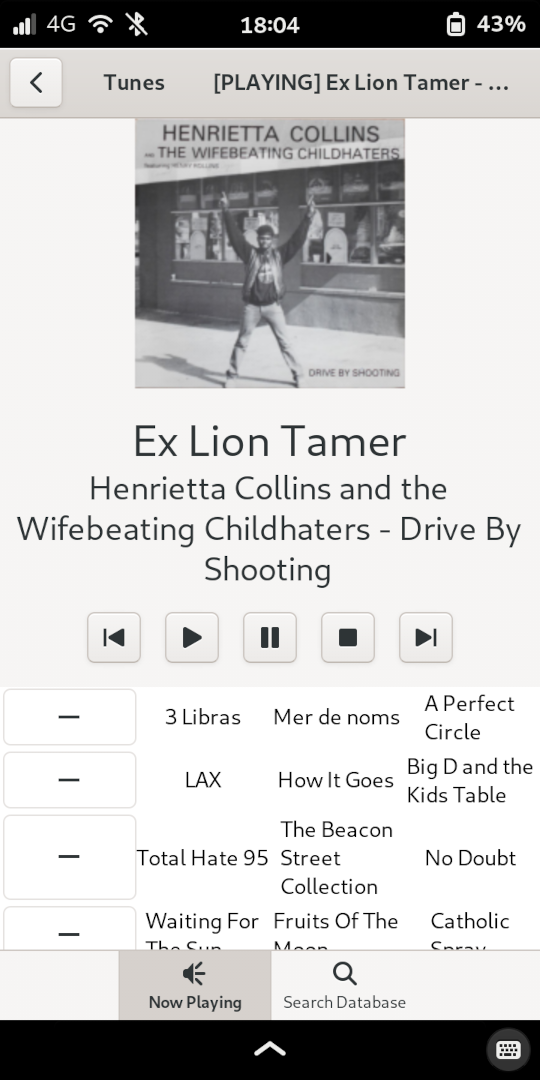
I haven't updated the APKBUILD to install it, yet, but I've made a tunes.desktop
file so that the application shows up on my home screen.
[Desktop Entry]
Type=Application
Version=1.0
Name=Tunes
Comment=Mobile-friendly MPD client
Icon=mpd
Terminal=false
Exec=/usr/bin/tunes
Categories=Multimedia
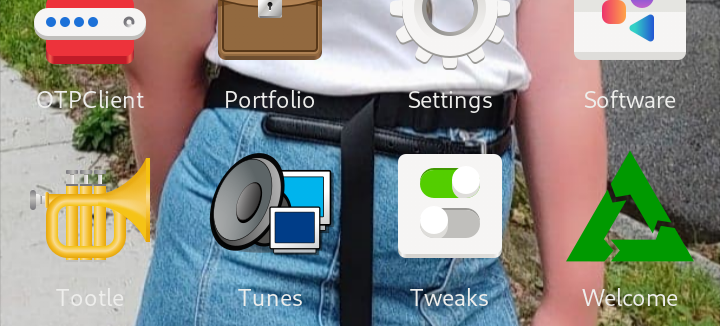
Final thoughts? That was much more pleasant than anything I've done in Android land. I've got an application that's actually useful to me that didn't take me more than a week – a week where I was working late most nights, mind you.
It's still a proof-of-concept rather than a battle-tested application thats ready for packaging upstream, but it's enough to go off of. I'm expecting to continue working on it, but I might pull in Relm4 or vgtk to cut down on some of the boilerplate and event loop spaghetti.
- Comments on the
mpdinteractions
You may notice that I've vendored the entire
mpdcrate into the thetunesrepository. In short: thempdcrate is pretty old and a little broken. I ran into this (two-year old!) issue using the query interface, so I clonedmasterand applied SimonPersson's patch. Then I ran into another issue where I was trying to send a song path across a channel instead of the wholeSong, and I wasn't able to use that for the API calls I wanted to make, becauseToSongPathisn't implemented forStringor&str. It should be, since there's animpl ToSongPath for dyn AsRef<str>, but there isn't, so I had to add my ownpush_strmethod. I also merged in another pull request from SimonPersson which addsalbumartsupport… so I have a pseudo-fork of thempdcrate sitting around, which I had to bring into version control if anyone was going to reasonably build Tunes from source.When I eventually come back to this to make it more than a useful prototype, I'll probably drop the 'mpd' crate for something that's better-maintained. Either mpdrs as it's a plain old fork of 'mpd' with the things I want, or mpd_client if I decide I want to bring in all of Tokio for this little application. Decisions, decisions.
Porting Software
What one might expect to follow from "it's easy to develop for the PinePhone because you're writing applications as if you were writing them for your workstation" is that it should be relatively easy to port existing applications as well. And this is indeed the case. The compile times can be painful, but I was successful in cross-compiling diamondburned's gtkcord4 – which has no existing Alpine package to my knowledge – to run on the PinePhone.
# Contributor: Jakob L. Kreuze <[REDACTED]>
# Maintainer: Jakob L. Kreuze <[REDACTED]>
pkgname=gtkcord4
pkgver=0.0.2
pkgrel=0
pkgdesc="GTK4 Discord client in Go"
url="https://github.com/diamondburned/gtkcord4"
arch="all"
license="GPL-3.0"
makedepends="gtk4.0-dev gobject-introspection-dev libcanberra-dev go"
source="$pkgname-$pkgver.tar.gz::https://github.com/diamondburned/gtkcord4/archive/refs/tags/v${pkgver}.tar.gz"

build() {
    go build
}

package() {
    install -D -m755 $pkgname "$pkgdir"/usr/bin/$pkgname
}

sha512sums="
1c0465f4c2d54794551811c0a536b610a51d3f795c403af3cf10954a46770b42d1aadef4709818f935aa54e2b413052546bdde5214f44e89d5ad2e2d7cbdf514  gtkcord4-0.0.2.tar.gz
"
The above is all it took. I initialized pmbootstrap, made a directory named
gtkcord4 under cache_git/pmaports/main, ran pmbootstrap build --arch,=aarch64
gktcord4, and a couple hours later and I had a gtkcord4-0.0.2-r0.apk sitting
under packages/v21.12/aarch64.
I'm not sure diamondburned ever anticipated that gtkcord4 would be running on a mobile device, but thanks to their choice to use GTK4, I didn't have to make any changes to the code and it still runs great on my device.
![[10:46 AM] Jakob: If you managed to get enough samples, do you think you could do a TEMPEST-like attack on USB? [Line Break] [10:47 AM] Ergodic: I don't see why not [Line Break] [10:47 AM] Jakob: Or serial, or any other standard where the connection doesn't have a lot to keep it from being leaky [Line Break] [10:47 AM] Ergodic: I think Israel can dump ram from far away right? [Line Break] [10:47 AM] Ergodic: So pretty much anything [Line Break] [10:47 AM] Ergodic: Well [Line Break] [10:48 AM] Ergodic: Actually [Line Break] [10:48 AM] Ergodic: Wait [Line Break] [10:48 AM] Ergodic: With um [Line Break] [10:48 AM] Ergodic: A HdMI it doesn't matter if some data is wrong cuz you can keep resampling, same with ram [Line Break] [10:48 AM] Ergodic: But you can't with USB unless they're doing the same thing 40 times in a row 👀 [Line Break] [10:49 AM] Ergodic: Like depending on the protocol, how accurate do you wanna be](./gtkcord4-on-pinephone.png)
Some applications might need to be modified to work well on a touchscreen. I haven't had to do that yet, and even if I did, I would expect it to be a difficult topic to cover in this (already quite long) article. The part that I will elaborate on is how we got to that magic code block above. The gtkcord4 example is a little boring because of how little it takes to invoke the Go build system,15 so let's port OpenXCOM instead. I'll start from scratch and document my process as I go.
Speaking of process, this is basically what I follow:
- Determine if the software in question is already packaged in another
source-based distribution (basically Gentoo or the Arch AUR).
- If so, translate the recipe to APKBUILD. In the case of Gentoo, figure out
what set of
USEflags "make sense" as a default. - Use pkgs.alpinelinux.org to map each dependency in the original package spec to an Alpine dependency.
- If so, translate the recipe to APKBUILD. In the case of Gentoo, figure out
what set of
- If it isn't…
- Find a skeleton APKBUILD (like the "hello world" example in the "Building and Installing the Application on PostmarketOS" section).
- Fill it in with the instructions to compile from upstream. I find you need
to specify
buildandpackageas the bare minimum if you explicitly disablecheck. - Guess-and-check for dependencies. Sometimes upstream will be good about enumerating them, sometimes not so much.
I know that openxcom is packaged in Gentoo, so we'll start there.
# Copyright 1999-2021 Gentoo Authors
# Distributed under the terms of the GNU General Public License v2

EAPI=7

inherit cmake xdg-utils

DESCRIPTION="Open-source reimplementation of the popular UFO: Enemy Unknown"
HOMEPAGE="https://openxcom.org/"

if [[ ${PV} == *9999 ]]; then
    inherit git-r3
    EGIT_REPO_URI="https://github.com/SupSuper/OpenXcom.git"
else
    COMMIT="ea9ac466221f8b4f8974d2db1c42dc4ad6126564"
    SRC_URI="https://github.com/SupSuper/OpenXcom/archive/${COMMIT}.tar.gz -> ${P}.tar.gz"
    KEYWORDS="~amd64 ~arm64 ~x86"
    S="${WORKDIR}/OpenXcom-${COMMIT}"
fi

LICENSE="GPL-3+ CC-BY-SA-4.0"
SLOT="0"
IUSE="doc"

RDEPEND="
    >=dev-cpp/yaml-cpp-0.5.1
    media-libs/libsdl[opengl,video]
    media-libs/sdl-gfx
    media-libs/sdl-image[png]
    media-libs/sdl-mixer[flac,mikmod,vorbis]"
DEPEND="${RDEPEND}"
BDEPEND="doc? ( app-doc/doxygen )"

DOCS=( README.md )

src_compile() {
    cmake_src_compile
    use doc && cmake_build doxygen
}

src_install() {
    use doc && local HTML_DOCS=( "${BUILD_DIR}"/docs/html/. )
    cmake_src_install
}

pkg_postinst() {
    xdg_icon_cache_update

    elog "In order to play you need copy GEODATA, GEOGRAPH, MAPS, ROUTES, SOUND,"
    elog "TERRAIN, UFOGRAPH, UFOINTRO, UNITS folders from original X-COM game to"
    elog "/usr/share/${PN}/UFO"
    elog
    elog "If you want to play the TFTD mod, you need to copy ANIMS, FLOP_INT,"
    elog "GEODATA, GEOGRAPH, MAPS, ROUTES, SOUND, TERRAIN, UFOGRAPH, UNITS folders"
    elog "from the original Terror from the Deep game to"
    elog "/usr/share/${PN}/TFTD"
    elog
    elog "If you need or want text in some language other than english, download:"
    elog "https://openxcom.org/translations/latest.zip and uncompress it in"
    elog "/usr/share/${PN}/common/Language"
}

pkg_postrm() {
    xdg_icon_cache_update
}
Although I probably should, I'm not going to bother with postinst or postrm
right now. I'm also not going to build the docs. What we can tell immediately is
that this is a CMake project (so we should find an APKBUILD for something else
that uses CMake – I used gzdoom) and the dependencies are the following:
yaml-cppsdlsdl_gfxsdl_imagesdl_mixer
All of these are packaged in Alpine except sdl_mixer, so we'll need to port that
ourselves. I was able to take the APKBUILD for sdl_mixer and use that as a
skeleton. The packages are packaged very similarly, so I was able to fill in the
blanks with some of the info from the Gentoo package.
# Contributor: Jakob L. Kreuze <[REDACTED]>
# Maintainer: Jakob L. Kreuze <[REDACTED]>
pkgname=sdl_gfx
pkgver=2.0.26
pkgrel=3
pkgdesc="Graphics drawing primitives library for SDL"
url="https://www.ferzkopp.net/wordpress/2016/01/02/sdl_gfx-sdl2_gfx/"
arch="all"
license="zlib"
makedepends="sdl-dev"
subpackages="$pkgname-dev"
source="http://www.ferzkopp.net/Software/SDL_gfx-2.0/SDL_gfx-$pkgver.tar.gz"
builddir="$srcdir"/SDL_gfx-$pkgver

prepare() {
    default_prepare
    update_config_sub
    update_config_guess
}

build() {
    ./configure \
        --build=$CBUILD \
        --host=$CHOST \
        --prefix=/usr \
        --sysconfdir=/etc \
        --mandir=/usr/share/man \
        --infodir=/usr/share/info
    make
}

package() {
    make DESTDIR="$pkgdir" install
}

sha512sums="e571caa0d7575683efd4cf8f0a41ab10f4acf913f9ece216ac823af11da22c8734fc2c0ea049009a3e1a53715e49622f5bfcfdbdafb95e5151990d0a4eb69c01  SDL_gfx-2.0.26.tar.gz"
It took a little bit of trial and error to arrive at the APKBUILD above. I first
ran into an issue with autotools not recognizing the target platform.
>>> sdl_gfx: Building pmos/sdl_gfx 2.0.26-r3 (using abuild 3.9.0-r0) started Tue, 23 Aug 2022 01:28:27 +0000
>>> sdl_gfx: Checking sanity of /home/pmos/build/APKBUILD...
>>> sdl_gfx: Cleaning up srcdir
>>> sdl_gfx: Cleaning up pkgdir
>>> sdl_gfx: Fetching http://www.ferzkopp.net/Software/SDL_gfx-2.0/SDL_gfx-2.0.26.tar.gz
  % Total    % Received % Xferd  Average Speed   Time    Time     Time  Current
                                 Dload  Upload   Total   Spent    Left  Speed
100   251  100   251    0     0   1764      0 --:--:-- --:--:-- --:--:--  2127
100 1729k  100 1729k    0     0  2103k      0 --:--:-- --:--:-- --:--:-- 2103k
>>> sdl_gfx: Fetching http://www.ferzkopp.net/Software/SDL_gfx-2.0/SDL_gfx-2.0.26.tar.gz
>>> sdl_gfx: Checking sha512sums...
SDL_gfx-2.0.26.tar.gz: OK
>>> sdl_gfx: Unpacking /var/cache/distfiles/SDL_gfx-2.0.26.tar.gz...
checking build system type... Invalid configuration `aarch64-alpine-linux-musl': machine `aarch64-alpine-linux' not recognized
configure: error: /bin/sh ./config.sub aarch64-alpine-linux-musl failed
>>> ERROR: sdl_gfx: build failed
(011680) [21:28:30] ^^^^^^^^^^^^^^^^^^^^^^^^^^^^^^^^^^^^^^^^^^^^^^^^^^^^^^^^^^^^^^^^^^^^^^
(011680) [21:28:30] NOTE: The failed command's output is above the ^^^ line in the log file: /home/jakob/Containers/pmbootstrap/pmbootstrap/log.txt
(011680) [21:28:30] ERROR: Command failed (exit code 1): (buildroot_aarch64) % cd /home/pmos/build; busybox su pmos -c CARCH=aarch64 SUDO_APK='abuild-apk --no-progress' PATH=/native/usr/lib/crossdirect/aarch64:/usr/lib/ccache/bin:/usr/local/sbin:/usr/local/bin:/usr/sbin:/usr/bin:/sbin:/bin HOME=/home/pmos abuild -D postmarketOS -d
(011680) [21:28:30] See also: <https://postmarketos.org/troubleshooting>
(011680) [21:28:30] Traceback (most recent call last):
  File "/home/jakob/Containers/pmbootstrap/.venv/lib/python3.10/site-packages/pmb/__init__.py", line 49, in main
    getattr(frontend, args.action)(args)
  File "/home/jakob/Containers/pmbootstrap/.venv/lib/python3.10/site-packages/pmb/helpers/frontend.py", line 114, in build
    if not pmb.build.package(args, package, arch_package, force,
  File "/home/jakob/Containers/pmbootstrap/.venv/lib/python3.10/site-packages/pmb/build/_package.py", line 520, in package
    (output, cmd, env) = run_abuild(args, apkbuild, arch, strict, force, cross,
  File "/home/jakob/Containers/pmbootstrap/.venv/lib/python3.10/site-packages/pmb/build/_package.py", line 447, in run_abuild
    pmb.chroot.user(args, cmd, suffix, "/home/pmos/build", env=env)
  File "/home/jakob/Containers/pmbootstrap/.venv/lib/python3.10/site-packages/pmb/chroot/user.py", line 26, in user
    return pmb.chroot.root(args, cmd, suffix, working_dir, output,
  File "/home/jakob/Containers/pmbootstrap/.venv/lib/python3.10/site-packages/pmb/chroot/root.py", line 76, in root
    return pmb.helpers.run_core.core(args, msg, cmd_sudo, None, output,
  File "/home/jakob/Containers/pmbootstrap/.venv/lib/python3.10/site-packages/pmb/helpers/run_core.py", line 347, in core
    check_return_code(args, code, log_message)
  File "/home/jakob/Containers/pmbootstrap/.venv/lib/python3.10/site-packages/pmb/helpers/run_core.py", line 219, in check_return_code
    raise RuntimeError(f"Command failed (exit code {str(code)}): " +
RuntimeError: Command failed (exit code 1): (buildroot_aarch64) % cd /home/pmos/build; busybox su pmos -c CARCH=aarch64 SUDO_APK='abuild-apk --no-progress' PATH=/native/usr/lib/crossdirect/aarch64:/usr/lib/ccache/bin:/usr/local/sbin:/usr/local/bin:/usr/sbin:/usr/bin:/sbin:/bin HOME=/home/pmos abuild -D postmarketOS -d
Fortunately, it wasn't too difficult to find the issue online. Someone had tried
(unsuccessfully) to add sdl_ttf to aports and ran into the same issue. The
recommendation in the MR comments was to include the prepare block above.
When that was sorted, I had a sdl_gfx package that I could use as a dependency
for openxcom.
# Contributor: Jakob L. Kreuze <[REDACTED]>
# Maintainer: Jakob L. Kreuze <[REDACTED]>
_commit="ea9ac466221f8b4f8974d2db1c42dc4ad6126564"
pkgname=openxcom
pkgver=1.0.0
pkgrel=1
pkgdesc="Open-source reimplementation of the popular UFO: Enemy Unknown"
url="https://openxcom.org/"
arch="all"
license="GPL-3.0-or-later"
makedepends="cmake ninja yaml-cpp-dev sdl-dev sdl_gfx-dev sdl_image-dev sdl_mixer-dev glu-dev libexecinfo-dev"
depends="libexecinfo"
source="openxcom-$pkgver.tar.gz::https://github.com/OpenXcom/OpenXcom/archive/$_commit.tar.gz
0001-Link-execinfo-unconditionally.patch"
builddir="$srcdir"/OpenXcom-$_commit

build() {
    if [ "$CBUILD" != "$CHOST" ]; then
        CMAKE_CROSSOPTS="-DCMAKE_SYSTEM_NAME=Linux -DCMAKE_HOST_SYSTEM_NAME=Linux"
    fi
    cmake -B build -G Ninja \
        -DCMAKE_BUILD_TYPE=Release \
        -DCMAKE_INSTALL_PREFIX=/usr \
        -DBUILD_SHARED_LIBS=True \
        $CMAKE_CROSSOPTS
    cmake --build build
}

package() {
    DESTDIR="$pkgdir" cmake --install build
}

sha512sums="57ff9a9cbbbf48b8c4f792458edf0590d7d0df9a5805eab13a4c984713311e98587afca00778e82bd66fb2f330b354ca80703b87922a92f9ae48e5bdecf68442  openxcom-1.0.0.tar.gz
de4cc52530200992fef0e723acd59fef1b214f5b12baabec4dcca03820fbbc38c30033c0707f918fccc29e7d0d67ddef0c2a7be56d21b2bba7221899c759c282  0001-Link-execinfo-unconditionally.patch"
where 0001-Link-execinfo-unconditionally.patch is the following:
From 2fe3e39c90086c7e3953d83ce75b0686ee4f5813 Mon Sep 17 00:00:00 2001
From: "Jakob L. Kreuze" <[REDACTED]>
Date: Tue, 23 Aug 2022 20:11:16 -0400
Subject: [PATCH] Link execinfo unconditionally

---
 src/CMakeLists.txt | 4 +---
 1 file changed, 1 insertion(+), 3 deletions(-)

diff --git a/src/CMakeLists.txt b/src/CMakeLists.txt
index d484380ba..b7d3020bd 100644
--- a/src/CMakeLists.txt
+++ b/src/CMakeLists.txt
@@ -485,9 +485,7 @@ if ( WIN32 )
 endif ()

 # backtrace(3) requires libexecinfo on some *BSD systems
-if (${CMAKE_SYSTEM_NAME} MATCHES FreeBSD OR ${CMAKE_SYSTEM_NAME} MATCHES NetBSD OR ${CMAKE_SYSTEM_NAME} MATCHES OpenBSD)
-  set ( system_libs -lexecinfo )
-endif ()
+set ( system_libs -lexecinfo )

 target_link_libraries ( openxcom ${system_libs} ${SDLIMAGE_LIBRARY} ${SDLMIXER_LIBRARY} ${SDLGFX_LIBRARY} ${SDL_LIBRARY} ${OPENGL_LIBRARIES} debug ${YAMLCPP_LIBRARY_DEBUG} optimized ${YAMLCPP_LIBRARY} )

--
2.37.2
The first error I got was about a missing mmintrin.h. I opened up the source
code and found that was under an IFDEF for MMX support, so I did a ./configure
--help to figure out how to disable that. After that, I was getting a message
about a missing glu.h.
[63/313] Building CXX object src/CMakeFiles/openxcom.dir/Mod/RuleVideo.cpp.o
ninja: job failed: /native/usr/lib/crossdirect/aarch64/g++ -DDATADIR=\"/usr/share/openxcom/\" -DGIT_BUILD=1 -I/usr/include/SDL -I/usr/include/yaml-cpp -I/home/pmos/build/src/OpenXcom-ea9ac466221f8b4f8974d2db1c42dc4ad6126564/build -Os -fomit-frame-pointer -O3 -DNDEBUG -std=gnu++11 -MD -MT src/CMakeFiles/openxcom.dir/Mod/RuleVideo.cpp.o -MF src/CMakeFiles/openxcom.dir/Mod/RuleVideo.cpp.o.d -o src/CMakeFiles/openxcom.dir/Mod/RuleVideo.cpp.o -c /home/pmos/build/src/OpenXcom-ea9ac466221f8b4f8974d2db1c42dc4ad6126564/src/Mod/RuleVideo.cpp
In file included from /home/pmos/build/src/OpenXcom-ea9ac466221f8b4f8974d2db1c42dc4ad6126564/src/Mod/../Engine/OpenGL.h:15,
                 from /home/pmos/build/src/OpenXcom-ea9ac466221f8b4f8974d2db1c42dc4ad6126564/src/Mod/../Engine/Screen.h:22,
                 from /home/pmos/build/src/OpenXcom-ea9ac466221f8b4f8974d2db1c42dc4ad6126564/src/Mod/RuleVideo.cpp:21:
/usr/include/SDL/SDL_opengl.h:47:10: fatal error: GL/glu.h: No such file or directory
   47 | #include <GL/glu.h> /* Header File For The GLU Library */
      |          ^~~~~~~~~~
compilation terminated.
ninja: subcommand failed
>>> ERROR: openxcom: build failed
I went ahead and added the glu-dev dependency, after which point I was getting
some warnings about redefinitions. So I have a feeling this might have been
another thing that was behind an IFDEF, but that's a problem for later.
[218/313] Building CXX object src/CMakeFiles/openxcom.dir/Engine/AdlibMusic.cpp.o
ninja: job failed: /native/usr/lib/crossdirect/aarch64/g++ -DDATADIR=\"/usr/share/openxcom/\" -DGIT_BUILD=1 -I/usr/include/SDL -I/usr/include/yaml-cpp -I/home/pmos/build/src/OpenXcom-ea9ac466221f8b4f8974d2db1c42dc4ad6126564/build -Os -fomit-frame-pointer -O3 -DNDEBUG -std=gnu++11 -MD -MT src/CMakeFiles/openxcom.dir/Engine/CrossPlatform.cpp.o -MF src/CMakeFiles/openxcom.dir/Engine/CrossPlatform.cpp.o.d -o src/CMakeFiles/openxcom.dir/Engine/CrossPlatform.cpp.o -c /home/pmos/build/src/OpenXcom-ea9ac466221f8b4f8974d2db1c42dc4ad6126564/src/Engine/CrossPlatform.cpp
/home/pmos/build/src/OpenXcom-ea9ac466221f8b4f8974d2db1c42dc4ad6126564/src/Engine/CrossPlatform.cpp:68:10: fatal error: execinfo.h: No such file or directory
   68 | #include <execinfo.h>
      |          ^~~~~~~~~~~~
compilation terminated.
ninja: subcommand failed
>>> ERROR: openxcom: build failed
The last errors I got were related to execinfo. This is, to my knowledge, a
glibc thing. Fortunately, Alpine being a popular base image in Docker land means
the workarounds are easy to find on the 'net. The missing header file was one,
thing, but then I was getting some linker errors about a missing symbol for
backtrace. Searching came up with an issue in PyTorch which gave me some
insight, and then I found a pull request upstream related to it. My patch above
just makes the fix in that pull request unconditional (in master, it's only
applied on BSD); we get all the backtrace symbols from execinfo, but we need to
make sure it's actually linked into the binary.
Then.. shit. It built correctly, but my pmbootstrap setup was a version behind
the PostmarketOS on my phone (v21.12 vs v22.06), so I was getting some
dependency resolution errors. I re-initialized pmbootstrap and then learned that
sdl-dev is no longer supported, so I had to backport it from edge/testing. It
was at least smooth sailing after that.
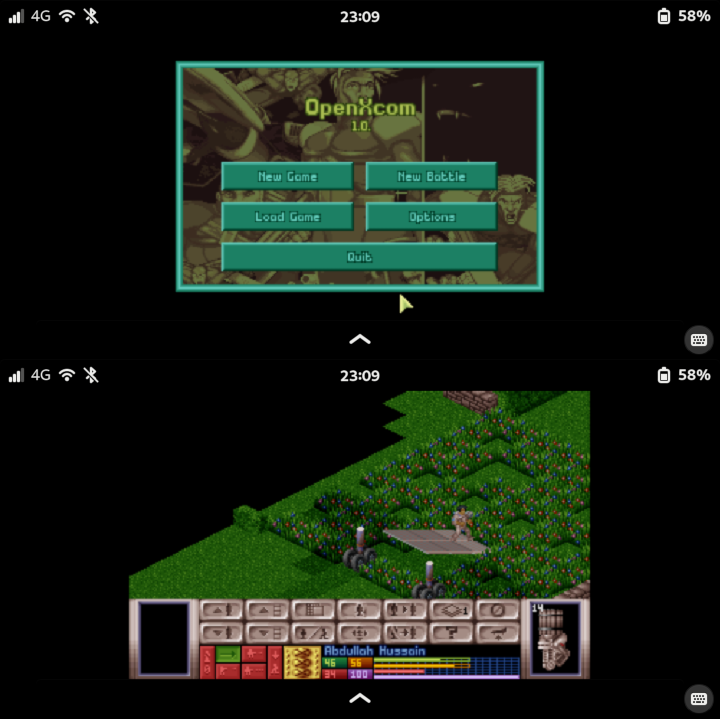
So porting software to the PinePhone is relatively easy.
You don't even have to go through half of the mess that I did if you don't care
about cross-compiling or having things tracked by the package manager. You could
probably just install the gcc toolchain and do a make && sudo make install on
your phone; Alpine/PostmarketOS have glibc compatibility. Or, hell, use a
Flatpak/AppImage/Snap if you want to.
However you do it, the end result is the same. You get to use the same Linux applications on your phone that you would on your desktop, and I think that's great.
Community
Despite owning several PINE64 widgets and doodads, I've basically had no interactions with the PINE64 community. I leverage community maintained resources like the PINE64 wiki and the PINE64 forums frequently, but I don't post regularly. I think I should, but at the time of writing this, I don't.
The community of people who use the PinePhone is small, but those within are very willing to helping others, which I admire. The best example I have of this was when I was preparing for DEF CON and I emailed Biktorgj to ask about the FOTA code in the EG25-G modem. I sent this in the morning while I was getting ready for work and literally minutes later I got a detailed response about how it's been removed from the firmware. It was at that point I knew that the PinePhone software stack was in good hands.
(If you're curious, this was the response.)
Hi, all the FOTA code from Quectel doesn't exist in the custom firmware:
- LK bootloader has all the relevant code removed
- The main root filesystem doesn't even have a tool to download it
- The recovery partition, which in stock is used to apply the updates is replaced with a minimal bootable filesystem that doesn't have anything except adb, a shell and strace
If there's something that could be broken into (discarding physical access, if someone has it you're done anyway) would need to be done with a bogus GSM network exploiting some bug in the ADSP firmware (but you could have that with any phone)
Hope it helps :)
But, really, these sorts of things make me want to be more involved in the community. Maybe I'll do something related to mobile Linux for my master's thesis.
An unrelated aside: the only time I've heard of a trojan for Linux circulating in the wild was a snake game for the PinePhone, but I don't think this says terribly much about the PINE64 community.
Social Implications
A few weeks ago I had a party at my place, and some chick was talking about how she considered owning an Android phone to be a red flag. I turned to my friend to say that I hoped my weird-ass Linux phone wasn't a red flag. I thought I was funny. But in reality, the difference doesn't matter to non-technical folk. To them it's just the color of a "bubble," or whatever. I don't understand why it's a red flag, nor do I particularly care, I just wanted to lead with an anecdote about why one's choice of mobile phone somehow carries stigma in my (doomed) generation. If I cared about that, I probably wouldn't be using a PinePhone, but I don't often surround myself with these types of people who care about what kind of cell phone you have.
There have been a couple of rough spots because of literal technical limitations with the PinePhone – for example, PostmarketOS v21.06 wasn't MMS-capable, so I missed out on some group texts and photos that my parents were sending. But my parents, my partner, and my friends haven't complained about me using a weird ass half-functional phone. They've put up with it, and for that I'm appreciative. That said, it's been a while since I've had one of those annoying technical problems, so I'm not sure they've really noticed.
All-in-all, the people I do tell about how I use a phone running mainline Linux (mainly coworkers) find it cool but also very characteristic of who I am as a person. I think that's a fair way to conclude this section.
Conclusions
I hinted at this in the introduction, but I'll say it again: the PinePhone is not a popular choice. I know precisely two people who own one. Both of whom seem happy to own one. I appreciate the PinePhone, and there are others who appreciate it as well, but the overwhelming opinion is that it isn't ready for most "real life" use-cases.
Come on down to the PINE64 mobile shop. We've got (hypothetical) exploding phones and core contributors leaving in protest of bureaucracy.
The PinePhone is unique in that it's backed by hobbyists rather than big companies. With the exception of some of its software components like the mainline Linux kernel, it doesn't have the constant inflow of resources to make it usable or convenient. It's well behind its "competitors" in terms of normal usability and support for running popular mobile applications. That's enough to make it a non-starter for many people. The PinePhone, and Linux phones more broadly, are likely to only garner the "free software nerd" crowd for the foreseeable future.
I'm hopeful that, as big players like Google continue moving in the wrong direction, interest in free and open alternatives will grow, and that we'll see start to see non-Android Linux as a viable option some day. But that time is certainly not now.
My experiences have been positive, but I am dogmatic about software freedom and privacy, and get by without a lot of what typical smartphones offer. Hence, I am not the typical smartphone user.
That said, if that brief summary of my situation resonates with you, the PinePhone is an excellent choice. I love my PinePhone because it's more like a workstation than some strange alien device that I can't easily hack on; it integrates incredibly well with the rest of my personal computing stack.
And it's certainly the best option on the market for me right now. The Librem 5 is the PinePhone's main "competitor," and I would recommend reading Amos B. Batto's article Comparing the Librem 5 USA and PinePhone Beta for some more articulate thoughts about the differences, but in my case, the Librem 5 is simply out of my price range.
I would love a device like the PinePhone but with more typical hardware, like a Qualcomm Snapdragon (though the mainline Linux support for newer Snapdragon SOCs leaves a bit to be desired.) A bigger battery would be nice, too – I wouldn't care if it made the phone unreasonably thick. Modular and easily serviceable.. with wake/suspend support that doesn't suck. Yeah. That's my dream phone. But I expect it'll remain a dream for a long while, so for now, I love my PinePhone.16
—
Footnotes:
While I tend to use "GNU/Linux" to refer to the kernel + user space, the distribution I'm running on my phone doesn't actually use GNU components. PostmarketOS is based on Alpine, which uses musl and BusyBox.
In practice, Android typically uses an outdated kernel with vendor-specific blobs and modifications, and it notably does not use the GNU/Linux userland. Bionic is the libc, SurfaceFlinger is the display server, and so on. For the most part, there is very little semblance between Android and the Linux distributions one may be familiar with. You cannot, for example, run a regular Linux application on Android.
If we take a minute to consider the policy without its partisan nuance, I think this was a good call (albeit poorly implemented).
Now that I've had a month to mull over this introduction, I think it's actually more likely that the power button was just being pressed down while it was shifting around in my pockets.
I think this term originates from Christine Lemmer-Webber. It's a neologism for arguing about which of some number of choices is the best, when one thing being better than another is not only subjective but also a triviality, and when the arguments tend to be unusually heated. American football teams is a good example. I don't think anyone actually cares about the Gnome versus KDE argument nowadays, though, (it seems to have been more relevant in my dad's time) so maybe it isn't accurate to call it footballing in 2022.
If I recall, my cousin had pulled out a picture of his bedroom back in the late 90's and was commenting on the Limp Bizkit poster, and I mentioned that they'd released an album earlier that week. (And said something about Fred Durst's new appearance.)
Using the Android calendar was so painful that I wrote some scripts to generate ICS files for my college classes, recurring meetings at work, etc., so I could import a couple hundred events at a time. I am so thankful that I don't need to do that anymore.
Folks message me on XMPP so infrequently that I can get by just using it on desktop.
Which is a bit of a shame. It wasn't a feature I used often on my old phone, but I was happy it was there. I have some really fond memories of sitting in the car when I was 16 and using the FM radio app on my phone to scan the airwaves as we passed through Maine during the winter.
It was a bit of a pain to set up when I first tried it, so I gave up.
I use scrot and sct for these tasks, respectively, on all of my X11-running machines. I've patched both sct and wlsunset to set the blue balance to 0 at night because high-energy visible light stimulates melanopsin receptors in the eye. I was never able to find an app that could do that on Android, so I'd have to manually adjust it every night.
The only attempt I've seen at "breaking into" Android land with something that isn't based on Java is David Boddie's DUCK, which I'd experimented with and enjoyed quite a bit. Unfortunately, I had my falling out with Android development around when I discovered it and never made anything of note with it.
And I can't figure out how to tell the compiler that I want to move the mutable sender into the closure and use that across all invocations. I don't think it's possible, but someone better than me at Rust is probably going to write me an email and tell me the better way to do this. When that happens, I'll update this post with an addendum.
The -t 3600 is to tell pmbootstrap not to kill itself if it doesn't see any output in half an hour. It's absolutely the most annoying thing in pmbootstrap because things just sometimes take a really long time to cross-compile.
I should have included go as a build dependency, come to think of it.
I considered a couple of different "clever" titles for this post, but settled on the simple "I love my PinePhone", after seeing a post of a similar name by Daniel Janus's about his GPD Micro PC. Coincidentally, a lot of the reasons he gives for enjoying the laptop line-up with my reasons for enjoying the PinePhone.
Comments (12)
https://jakob.space
This post's been out for a while, and I have two updates that I'd like to share:
https://commentpara.de/comment/1130.htm
When packaging for Alpine, is there a reason to use a fake raised ver num instead of using the git suffix - besides being easier/less of a hastle? Feel free to mail me: rkl at rosiesworkshop dot NET
https://commentpara.de/comment/1121.htm
This was an excellent and well-written blog post; thanks. I also have a brave heart PinePhone but I have learnt of some tricks and software from it; also just interesting in general to read your experience!
https://twitter.com/0daysfordays
Getting back to this a little late, but consider it done :) jakob.space/blog/i-love-my…
https://twitter.com/morpilim
I really want #Pinephone to succeed!
https://twitter.com/linmobblog
I would definitely appreciate it 😀
https://twitter.com/0daysfordays
Thanks! Would it help your cause if I linked to it in the article?
https://twitter.com/linmobblog
Great post, technical, nuanced and well written! (It's also a reminder for me to spend more time on making @linuxphoneapps known. 🙂)
https://twitter.com/0daysfordays
Thank you! Your feedback means a lot to me :)
https://twitter.com/SamuelJohnsnon
Fantastic article. 👏
https://twitter.com/0daysfordays
Thank you!
https://twitter.com/arikqk
your website is very cool!
Leave a Comment